
What is an API? What Non-Tech People Like You and Me Need to Know in the AI Era
Every time you open Grab, the app doesn’t magically know which driver is closest - it asks. Every time you log in with Google, the website doesn’t check your password itself - it asks. That mechanism of “going to ask” is exactly what an API is.
The interesting thing is you use APIs every day - you just never needed to know what they were. Until now, when AI agents are starting to handle tasks for you, from booking meetings to sending emails - and all of that runs through APIs.
What is an API?
API stands for Application Programming Interface - but the name matters less than what it does: let two pieces of software talk to each other using a shared set of rules.
Think of it like a restaurant: you’re the customer, the kitchen is the actual data system, and the waiter is the API. You don’t walk into the kitchen to grab your food - you order through the waiter, they pass the request to the kitchen, the kitchen prepares it, and the waiter brings it back to you. APIs work exactly the same way - a standardized middle layer that lets two sides communicate without either needing to know how the other works internally.
Technically, an API is a collection of endpoints - specific addresses you can send requests to and receive data from, each one doing a distinct job. One endpoint returns a list of products, another handles payments - each independent, each with its own documentation.
Why should you care about APIs?
Honestly, a few years ago I thought APIs were something only developers needed to worry about. But that’s changed - and the shift came from Claude, ChatGPT, and the AI tools that have become genuinely mainstream.
You’ve probably used at least one of them. And there’s a good chance you’ve tried building something for yourself - an automation in Zapier, a workflow connecting a few apps, or pulling AI into some part of your work. Somewhere along that journey, you ran into the word “API” - in an error message, a setup guide, or when AI explained why it couldn’t do what you asked.
Here’s the thing worth knowing: everything an AI agent does in the real world runs through an API. When you ask Claude to “book a meeting” or “send this email” - there’s no magic, it’s calling the Google Calendar API, the Gmail API. When your Zapier automation breaks at the end of the day, it’s probably a rate limit hit or an expired API key - not a logic error. When your dev team mentions “integrating the OpenAI API” and asks about cost per token - that’s API pricing, not a monthly subscription. Understanding APIs means you can actually participate in those conversations instead of just nodding along.
The level of understanding I’m talking about isn’t writing code to call an API yourself - it’s enough to know why something stopped working, where AI agent limitations come from, and why certain tools charge based on usage volume rather than a flat rate.
How does an API work?
The basic flow: application A sends a request to an API, the API validates it and retrieves data from system B, then returns a response back to A in an agreed-upon format - typically JSON, a structured text format that both machines and humans can read if you look closely enough.
The key insight is that neither application needs to know how the other works internally. Grab doesn’t need to understand how Google Maps builds its maps - it just needs to know which API to call, pass the coordinates, and receive back the optimal route. That’s why thousands of companies can integrate each other’s services without sharing internal code.
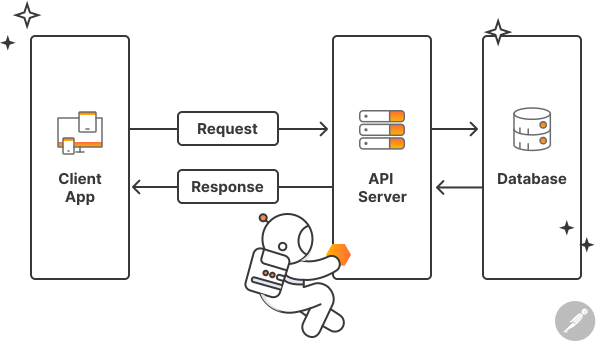 Client App sends a request to the API Server - the server processes it, pulls data from the Database, then returns a response. This is the basic flow behind almost every API
Types of APIs you encounter every day (without knowing it)
Not all APIs are the same - there are a few common architectures, each suited to a different kind of situation.
REST API - the most common type today
REST uses HTTP - the same protocol as websites. When you search for a product on an e-commerce site, when an app pulls data to display, almost all of that is REST. You can spot it by URLs like https://api.something.com/v1/products/123 - /v1 is the version, /products/123 is the endpoint fetching the product with ID 123. REST accounts for about 89% of APIs running on the internet today.
Webhook - the “reverse” API
REST is you asking, server responding. Webhooks flip that: the server proactively calls you when something happens. Stripe uses webhooks to notify your website the moment a customer completes a payment - instead of your website having to keep asking “did anyone pay yet?” every few seconds. If you use Zapier, Make, or n8n to connect apps, you’re essentially configuring webhooks every day.
WebSocket - persistent real-time connection
REST asks once, gets one answer, then disconnects. WebSocket is different - it maintains a continuous connection with data flowing back and forth in real time. The “is typing…” indicator in Messenger, live crypto prices updating every second, real-time chat on websites - all of these need WebSocket because they can’t wait for a new request to get new data.
GraphQL - ask for exactly what you need
REST returns a fixed block of data per endpoint, often more than you actually need. GraphQL lets you specify exactly which fields you want - like ordering “rice only, skip the soup” instead of getting a full tray and leaving half of it. Facebook built GraphQL to solve bandwidth problems when mobile apps needed to load data fast with as little data transfer as possible.
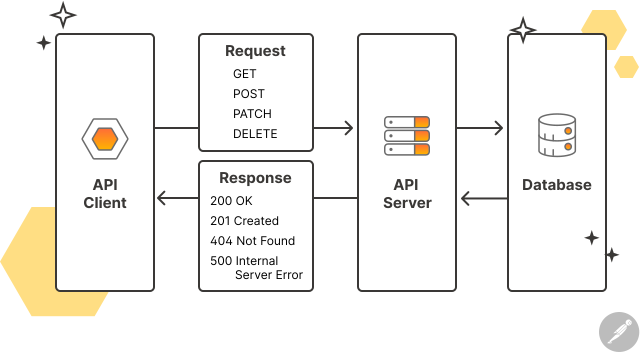 REST API uses HTTP methods (GET, POST, PATCH, DELETE) and returns status codes indicating the result - 200 success, 404 not found, 500 server error
Core API concepts worth knowing
When working with a technical team or using no-code tools, these terms come up constantly:
- Endpoint: The address of a specific function within an API.
/api/users/123is the endpoint that fetches info for the user with ID 123. - API Key: An authentication code that proves you have permission to use the API - keep it secret, don’t share it, never expose it in public code.
- Authentication: How an API verifies who you are. Most common: API Key, OAuth (login via Google/Facebook), and JWT tokens.
- Rate Limit: A cap on how many requests you can send in a given time window - say, 1,000 requests per day. Exceed it and the API rejects you. This is the most common reason automations mysteriously fail at the end of the day.
- Response Code: A three-digit number indicating the result.
200success,404not found,401not authenticated,429rate limit exceeded,500server-side error. - Latency: The time between sending a request and receiving a response - directly affects how fast your app feels.
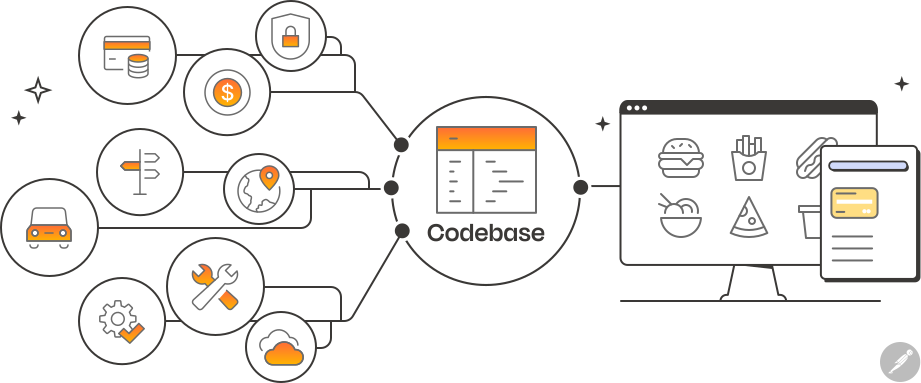 A food delivery app might use a dozen different APIs simultaneously - maps, payments, notifications, reviews - each from a separate provider
Frequently Asked Questions (FAQ)
Are APIs free or do they cost money?
Both. Many APIs offer a free tier with limits: Google Maps, OpenWeather, Stripe sandbox. Beyond that, they charge based on usage. AI APIs like OpenAI or Claude charge per token. Before integrating any API into a product, check the pricing page and estimate costs at your actual intended scale - numbers that look cheap during testing can multiply quickly in production.
How is an API different from a website?
Websites are designed for humans - they have interfaces, colors, buttons. APIs are designed for software - they return raw data (usually JSON) with no interface. The same underlying data source can have both a website for users to browse and an API for developers to integrate into other products - two different surfaces serving two different audiences.
Can I use an API without knowing how to code?
Yes. Zapier, Make, n8n, and Airtable all let you connect APIs through drag-and-drop interfaces. Postman is a tool for “testing” APIs through a visual interface without writing anything. Understanding basic concepts like endpoints, authentication, and response codes will make you significantly better at using those tools and handling errors when they come up.
Why do APIs fail and what should you do?
The most common causes: wrong or expired API Key (401), rate limit exceeded (429), data sent in the wrong format, or the provider’s server is down (500). The response code usually tells you the cause immediately. When an automation breaks, check the response code first, then look at the tool’s logs - there’s usually enough information to debug without needing to call a developer.
Summary
API is the invisible connection layer behind everything you use on the internet - and now it’s also what lets AI agents actually do things instead of just answering questions. You don’t need to write code to understand APIs, but understanding them helps you work better with technical teams, debug your own automations, and - most importantly - understand what an AI agent is actually doing when it says “done.”