
What is an SOP? Why You Need One - Especially When Working with AI Agents
An SOP (Standard Operating Procedure) is a document that describes, step by step, how to complete a task in a consistent, repeatable way. It sounds dry on paper - but it’s exactly what turns an AI Agent from an unpredictable tool into a reliable collaborator.
Most people use AI Agents like this: hand off a task, get a result, hope it’s right. Sometimes it is. Sometimes it isn’t - and you can’t figure out why. The problem isn’t that the AI lacks intelligence. The problem is that AI has no “sheet music” to play from. An SOP is that sheet music.
What is an SOP?
SOP stands for Standard Operating Procedure - a document that describes in detail how to carry out a specific process or task. It answers three questions:
- What needs to be done? - The list of steps, in the correct order
- How should each step be done? - The specific actions and quality standards involved
- What does a good result look like? - A clear definition of acceptable output
A simple example: an SOP for “posting to LinkedIn” might include: confirm the hook ends with a question or provocative statement, verify length is 800-1500 characters, add 3-5 niche hashtags, choose an image from the approved library, post between 7-8 AM or 6-7 PM.
An SOP isn’t an arbitrary checklist - it’s a verified process, specific enough that someone (or an AI) new to the task can do it right on the first try without asking follow-up questions.
SOPs aren’t new - they’ve been here for a long time
This is an important point to get right: SOPs weren’t invented by AI startups. They’ve existed since at least the 1940s, used by the US military and industrial manufacturers to ensure that every person - regardless of where they were trained or which shift they worked - executed the same process to the same standard.
McDonald’s has an SOP for every second of the burger-making process. Hospitals have SOPs for surgical procedures, from handwashing steps to every action in the operating room. Aviation has SOPs for pre-takeoff and landing checklists. Pilots don’t “remember” the checklist - they read it, every single time, in order.
These industries don’t use SOPs because they lack skilled people. They use SOPs because they understand that even the most skilled person has tired days, rushed days, distracted days. An SOP is a safety net, not a statement of distrust.
In modern business, SOPs are the backbone of every well-run organization - from franchise chains to global distributed SaaS teams. They’re how you externalize knowledge - pulling a process out of someone’s head and into a document, so the organization doesn’t depend on any single individual.
So why do individuals and small teams skip SOPs? Because with 1-2 people, keeping it in your head works fine. Until a third person joins. Or until you want to hand a task to an AI Agent.
How an SOP works in practice
A good SOP has three core components:
1. Trigger (when to run it): Describes the condition that kicks off the process. For example: “When a new idea arrives from any source - reading, a meeting, an observation.”
2. Steps: A list of specific actions in order. Each step contains ONE action - never bundle multiple things into one step. “Open Claude Projects → Paste idea → Run prompt template X → Review draft” is 4 steps, not 1.
3. Output definition: Describes what the result should look like. “A complete draft, 800-1500 characters, with hook, 3 body paragraphs, open-ended CTA, saved to /drafts/linkedin/YYYY-MM-DD-slug.md.”
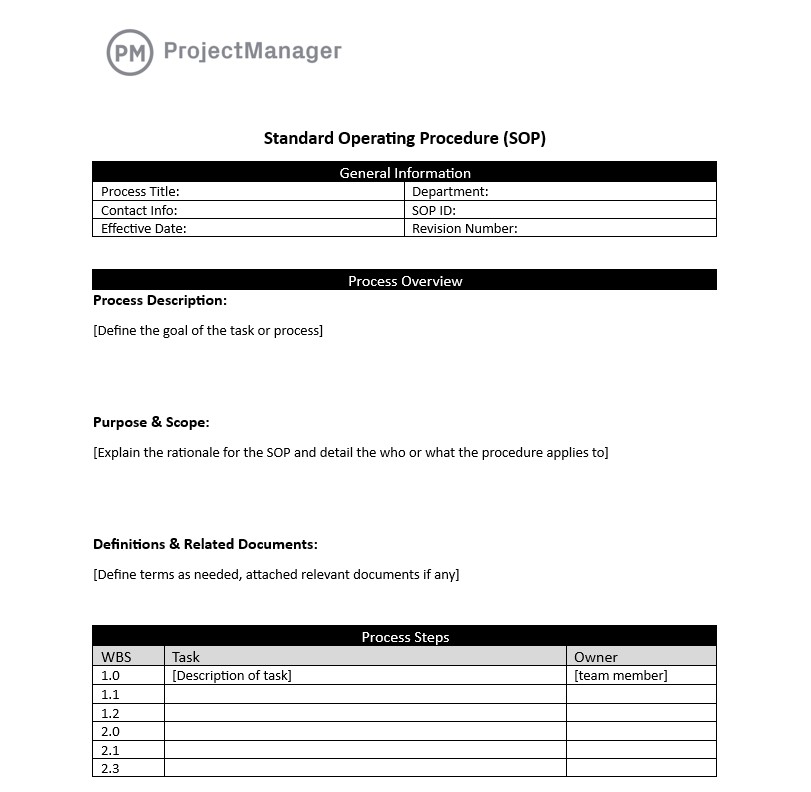 A proper SOP template always has all three components: trigger condition, sequential steps, and output definition - none are optional.
Why you need an SOP - real benefits
Consistent quality: Without an SOP, every time you do the same task you do it slightly differently - depending on mood, time pressure, how tired you are. With an SOP, the output is stable regardless of who does it or when.
Faster onboarding: Instead of “sit next to me and watch,” you hand the SOP to someone new and they can start immediately. Knowledge stops being trapped in one person’s head.
Easier bottleneck identification: When a process exists on paper, you can look at it and ask: “Which step takes the longest? Where do errors tend to happen?” Without an SOP, there’s nothing to analyze.
Foundation for automation: This is the most critical point for 2026. You can only automate what has already been standardized. A vague, undocumented task cannot be handed to an AI to execute reliably.
SOPs and AI Agents: why this pairing is non-negotiable
In the current era of Agentic AI, AI Agents are increasingly capable of executing complex multi-step workflows autonomously - reading files, calling APIs, generating content, saving results. But this is precisely why SOPs have become a hard requirement, not just a nice-to-have.
AI Agents have no “common sense” about how you work
A new human employee at least has life experience, social context, and the ability to ask when uncertain. An AI Agent has none of that. If you say “write a blog post about topic X” without an SOP, the AI must decide on its own:
- How long should the post be?
- Where should it be saved? What’s the filename format?
- Does it need a separate SEO title?
- Formal or casual tone?
- Should it include internal links?
The AI will make decisions based on general training data, not on what you specifically want. The result might be reasonable in a generic sense - but wrong in your specific context.
SOPs solve this. Not by writing longer prompts - but by separating the fixed process from the variable inputs.
An SOP lets AI run the right process instead of guessing it
Here’s the difference in practice:
Without an SOP:
“Write a LinkedIn post about the AI tool I just used”
The AI decides everything - length, structure, tone, where to save. Output might be fine. Might not.
With an SOP:
“Write a LinkedIn post about the AI tool I just used. Follow the SOP at /sop/linkedin-post.md”
The AI reads the SOP, executes each step, produces output to standard, saves to the right place.
The difference isn’t that the AI became smarter - it’s that the AI was given enough information to make the right decision instead of guessing.
The current moment: AI Agents are capable enough - but they need you to set the direction
This is the core tension of 2026: AI Agents can execute complex workflows - reading files, calling APIs, generating content, deploying. But “capable of executing” doesn’t mean “knows what you want.”
That gap - between “AI can do it” and “AI knows what I want” - is exactly the gap an SOP fills.
If you’re using AI Agents for real workflows (content, email, research, code review) without SOPs, you’re relying on luck. When the AI gets it right, you’re happy. When it doesn’t, you don’t know why - and you don’t know what to fix so it’s better next time.
SOP vs Agent Skill: what’s the difference?
When working with Claude or AI Agents that support Skills, you’ll encounter two easily-confused concepts: SOP and Agent Skill (the SKILL.md file). They’re closely related but not the same thing.
| SOP | Agent Skill | |
|---|---|---|
| File format | Plain Markdown, natural prose | SKILL.md with a specific structure |
| Who reads it | Humans and AI can both understand it | AI Agent reads it to execute automatically |
| Trigger | Read and follow - can be done manually | /slash-command - fires instantly |
| Flexibility | High - can describe exceptions and judgment calls | Every edge case must be defined upfront |
| Best for | Processes that need human judgment | Fully automatable, repeatable tasks |
| Maintenance | Easy - edit the text | Requires re-testing after every change |
The core relationship: SOPs are a prerequisite for building good Skills.
You can’t build an Agent Skill that runs correctly from a process that hasn’t been standardized. A Skill is just an SOP packaged into an executable file - but if the underlying SOP is vague, the Skill will produce inconsistent output no matter how carefully it’s written.
The right order: SOP first - Skill second. Write the SOP, run it manually a few times, confirm the output meets your standard - then package it as a Skill. This is exactly Steps 1 and 3 in the standard Skill-building process.
If you don’t need full automation yet - an SOP is enough. When the process is stable and runs frequently enough - promote it to a Skill.
How to write an SOP for AI Agent workflows
Step 1: Observe first, write second
Don’t sit down and write an SOP from scratch theoretically. Do the task manually 2-3 times, watch yourself as you work, then write the SOP. This ensures the SOP reflects reality, not an idealized version of what you think you do.
Step 2: Separate “fixed” from “variable”
Every task has two parts:
- Fixed - Structure, format, save location, quality standards - goes into the SOP
- Variable - Input data that changes each run - leave as
[placeholder]
Example: “Write a follow-up email for [client name] about [their pain point] using the format: greeting - meeting recap - proposed next step - demo CTA - sign off.”
Step 3: Test with AI, iterate on real results
Once the SOP is written, run it with an AI Agent immediately. Watch for:
- Does the AI read and follow each step correctly?
- Is the output in the right format?
- Which steps does the AI misunderstand?
Fix the SOP based on real results, not hunches. This process mirrors the standard Skill-building workflow - iterate until you get consistent, correct output across 3-5 consecutive test runs.
Step 4: Save the SOP where AI can access it
An SOP only has value if the AI can reach it. Save it as a Markdown file (.md) in your project or vault. When delegating to an AI Agent, point to it explicitly: “Follow the SOP at /sops/content-workflow.md.”
 SOP and BPM (Business Process Management) operate at two different levels: SOP defines how to do a task, BPM manages the full lifecycle of a process. Understanding SOPs is the first step toward building a properly functioning operational system.
SOP template: Writing a LinkedIn Post
Here’s a complete SOP for the LinkedIn post creation process - ready to copy and adapt to your own brand. Drop it into a .md file in your project and adjust the italicized sections to match how you actually work.
# SOP: Writing a LinkedIn Post

**Version:** 1.0
**Last updated:** [date]
**Used by:** You / AI Agent

---

## Trigger

Run this SOP when:
- You have a new idea ready to post on LinkedIn
- You have an insight from a meeting, event, or real-world observation
- You need to repurpose content from another source (blog post, thread, note)

---

## Input required before starting

- [ ] **Main topic** - 1-2 sentences describing the idea
- [ ] **Personal angle** - a real experience or distinct point of view
- [ ] **Post type** - pick one: `insight` / `how-to` / `story` / `list` / `contrarian`
- [ ] **Desired CTA** - ask for opinions / invite further reading / tag someone relevant

---

## Steps

### Step 1 - Choose a hook formula (2 min)

Pick the formula that fits your post type:

- **Insight:** `[Surprising stat or counterintuitive fact]` + `[Unexpected implication]`
  > "90% of marketers use AI to write faster. Almost no one uses it to think deeper."
- **How-to:** `I [did X] in [timeframe]. Here's how:`
  > "I cut my LinkedIn writing time from 45 minutes to 12. Here's the process:"
- **Story:** `[Specific situation] → [Turning point] → [Lesson learned]`
- **Contrarian:** `Everyone thinks [A]. The truth is [B].`

The hook must stand alone on the first line. No more than 15 words.

### Step 2 - Write the body (10-15 min)

Standard structure:
[Hook - line 1]
[Blank line]
[Para 1 - expand on the hook, 2-3 short sentences]
[Para 2 - core content: example / data / specific steps]
[Para 3 - personal insight or key takeaway]
[CTA - open-ended question or invitation to engage]
Writing standards:
- Max 3-4 sentences per paragraph
- Sentences under 20 words
- No more than 5 bullet points if using a list
- Never end with "Let me know in the comments" - too generic

### Step 3 - Pre-publish checklist (3 min)

- [ ] Hook stands alone - understandable without reading further
- [ ] Length: 800-1500 characters (LinkedIn sweet spot)
- [ ] At least 1 sentence carries a personal opinion - not just information
- [ ] CTA is a specific question, not "share your thoughts"
- [ ] No links in the body (drop them in the first comment if needed)
- [ ] Hashtags: 3-5 niche tags, placed at the end of the post

### Step 4 - Save and schedule

- Save draft to: `/drafts/linkedin/YYYY-MM-DD-[topic-slug].md`
- Post at: **7:00-8:30 AM** or **5:30-7:00 PM** (your local timezone)
- Avoid weekends unless the post is a personal story

---

## Output definition

A post meets the standard when:
- The hook is self-contained and immediately understandable
- Skimming (reading only the first line of each paragraph) still conveys the main point
- The reader knows exactly what to do after finishing (clear CTA)
- No sentence can be removed without losing meaningful information

---

## Exceptions and edge cases

- **Repurposed from a blog post:** Start from Step 2 - use the blog title as your hook
- **Breaking news / trend:** Skip Step 1 formula - write the hook naturally as a personal reaction
- **Collab post / mentioning someone:** Confirm with them before publishing
This SOP is complete enough to hand directly to an AI Agent - just provide the inputs at the top, and the AI can execute every step without asking follow-up questions. When you’re ready to fully automate this process, it’s the exact foundation you need to build a reusable Agent Skill.
Frequently Asked Questions (FAQ)
Is an SOP the same as a prompt? What's the difference?
No. A prompt is a one-time instruction you type into an AI for a specific task. An SOP is a document describing a repeatable process - independent of any particular run. A good prompt says “write article X in format Y.” An SOP says “here is the standard process for writing articles, including format Y, save location Z, and checklist W.” Prompts are single-use. SOPs are permanent.
How long should an SOP be?
Long enough that the AI has no room to guess - short enough to be readable and maintainable. There’s no fixed word count. An SOP for a posting workflow might need only 200 words. An SOP for client onboarding might need 800-1000. The only real criterion: after reading it, a new person (or AI) can execute the task correctly on the first attempt.
How many SOPs do I need?
Start with 1-3 SOPs for your most frequent and highest-stakes repeatable tasks. Don’t try to document everything at once - you’ll abandon the effort. Build SOPs progressively as the need becomes clear: the moment you catch yourself explaining the same thing for the second time - to a person or to an AI - that’s the signal to write an SOP.
Do SOPs get outdated? How often should I update them?
Yes. SOPs need updating whenever the process changes - new platform, new output format, new step added. The best signal: when an AI produces the same type of wrong output repeatedly (not randomly), the SOP is likely outdated. Update it immediately rather than waiting for a scheduled review cycle.
Is there a standard SOP template?
There’s no universal template because every workflow has its own requirements. But the core skeleton is: Objective (what this process achieves), Trigger (when to run it), Required inputs, Steps (sequential actions), Output definition (what a correct result looks like). Add or remove sections based on how complex the process is.
Summary
SOPs aren’t just for large enterprises. As AI Agents become embedded in individual and small-team workflows, an SOP is what lets you control outcomes instead of depending on luck. The starting point: pick one task you do every week and hand it to an AI Agent. Watch what the AI does when it’s missing information. Every place the AI has to guess - that’s exactly what belongs in your SOP.
Related
- Workflow Thinking with AI: From One-Off Tasks to Systems
- How to Build AI Skills: A 7-Step Process for Creating Skills That Actually Work
- AI Engineering Framework: Model, Context, Skill, and Prompt - The Four Pillars of Effective AI
- The Agentic AI Era: From Chatbots to Autonomous AI Agents That Actually Execute
- Context in AI: The Key to Turning Your AI from a Stranger into a Real Collaborator
- Agentic Workflows in Enterprise 2026: From AI Assistants to Autonomous Systems
- Claude Agent and Skills Explained: A Beginner's Guide to AI That Actually Works