
Why WordPress Is Still the #1 CMS - Despite Being Old and Hacked
WordPress launched in 2003 - the same year as Myspace. It gets attacked more than any other CMS on the planet. The codebase is heavy, plugins sometimes conflict, and the developer community is steadily migrating to modern frameworks. And yet it still runs 43% of the entire internet. Why?
The answer isn’t “because users don’t know any better.” The answer is that WordPress solved the right problem for the largest group of users - and it solved it well enough that nothing has truly replaced it in that segment.
What Is WordPress - and Why Won’t It Die?
WordPress is an open-source content management system (CMS) created by Matt Mullenweg and Mike Little in 2003. What started as a simple blogging platform grew into a full-stack web platform covering personal blogs, online media, e-commerce (via WooCommerce), LMS, and membership sites.
As of 2026, WordPress holds roughly 43% of global website market share - a staggering number compared to Shopify (~4%), Wix (~2%), or Squarespace (~1%). This isn’t passive legacy inertia. Tens of thousands of new WordPress sites are still launched every month.
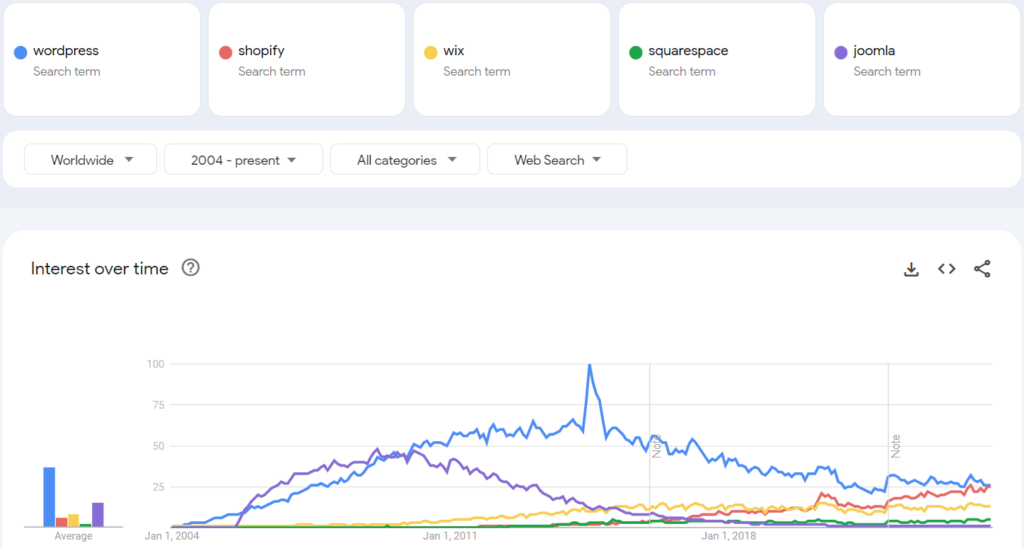 Source: Kinsta / Google Trends - WordPress (blue) leads by a massive margin over Shopify, Wix, Squarespace, and Joomla since 2004
What keeps WordPress alive isn’t that it’s the best technology. It’s that it’s good enough with almost zero barrier to entry.
Why WordPress Gets Hacked So Much - And Why That Misses the Point
WordPress is the biggest attack target in the CMS world. According to Sucuri’s reports, over 90% of infected websites they remediated in 2023 were running WordPress. That sounds alarming - until you put the number in proper context.
WordPress gets hacked more because it’s bigger, not because it’s less secure.
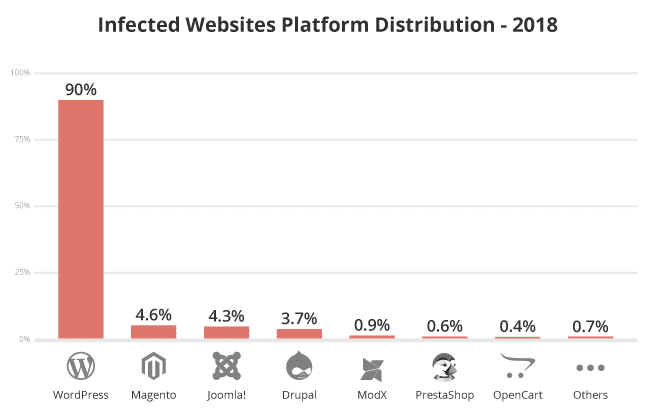 Source: Sucuri / Kinsta - 90% of malware-infected sites run WordPress. But this reflects market size, not platform quality.
When you control 43% of the internet, you become an economic target. Hackers don’t attack based on intrinsic platform value - they attack at scale. One WordPress exploit can hit millions of sites. One exploit on Craft CMS or Statamic hits a few thousand.
The vast majority of WordPress hacks come from three sources:
- Outdated or low-quality plugins - not WordPress core
- Weak passwords and missing 2FA
- Cheap hosting with poor security configuration
WordPress core is updated frequently and the security team responds quickly to CVEs. The real security problem is the plugin ecosystem - where anyone can publish code and millions of users install it without auditing.
The Real Reason WordPress Dominates - What Regular Users Actually Need
Regular users don’t need the best technology. They need:
- Get a website live as fast as possible - no coding required
- Manage content without calling a developer - add posts, update images, change prices
- SEO that just works - no infrastructure to build from scratch
- Someone to call when things break - WordPress freelancers are everywhere and affordable
WordPress solves all four of these better than any alternative at the same price and complexity level.
WordPress Is Easier on the Brain Because SEO Plugins Handle Everything
This is the biggest differentiator that rarely gets stated plainly: WordPress has plugins that do things modern stacks have to build themselves.
Install Yoast SEO or RankMath and you get:
- XML Sitemap auto-generated and updated after every publish
- Hreflang tags handled automatically for multilingual sites - no manual prop-passing per page
- Schema markup (Article, FAQ, BreadcrumbList) injected into HTML automatically
- SEO error dashboard surfacing issues immediately - missing meta descriptions, small images, weak internal links
- Auto-ping Google Search Console after each new post
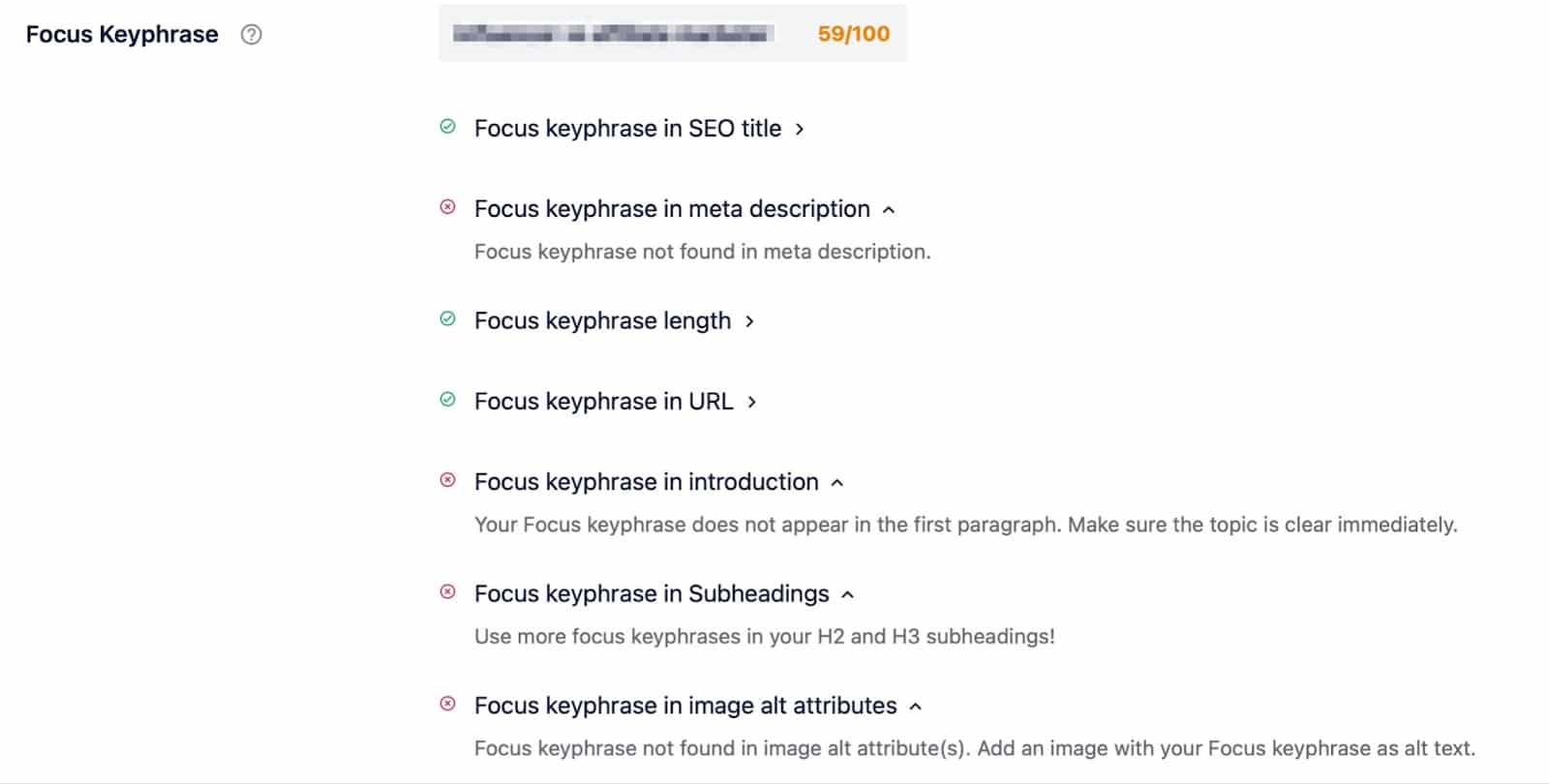 Yoast SEO analysis panel: live SEO score, keyphrase checklist, and actionable suggestions directly inside the editor - no tab switching
Compare this to a typical Astro + React stack: sitemap requires plugin configuration, hreflang tags must be passed manually as props to each page (easy to miss), structured data requires hand-written JSON-LD, and Google sitemap pings require a separate deploy webhook. Each piece isn’t hard in isolation - but together they take a full day to set up and there’s still room for gaps.
WordPress handles all of that in 5 minutes with a plugin install.
The Plugin Ecosystem - A Double-Edged Sword That’s Still an Advantage
WordPress’s plugin repository has over 60,000 free plugins. Whatever feature you can think of - booking systems, membership gates, forms, e-commerce, analytics, live chat, social feeds - there’s a plugin for it.
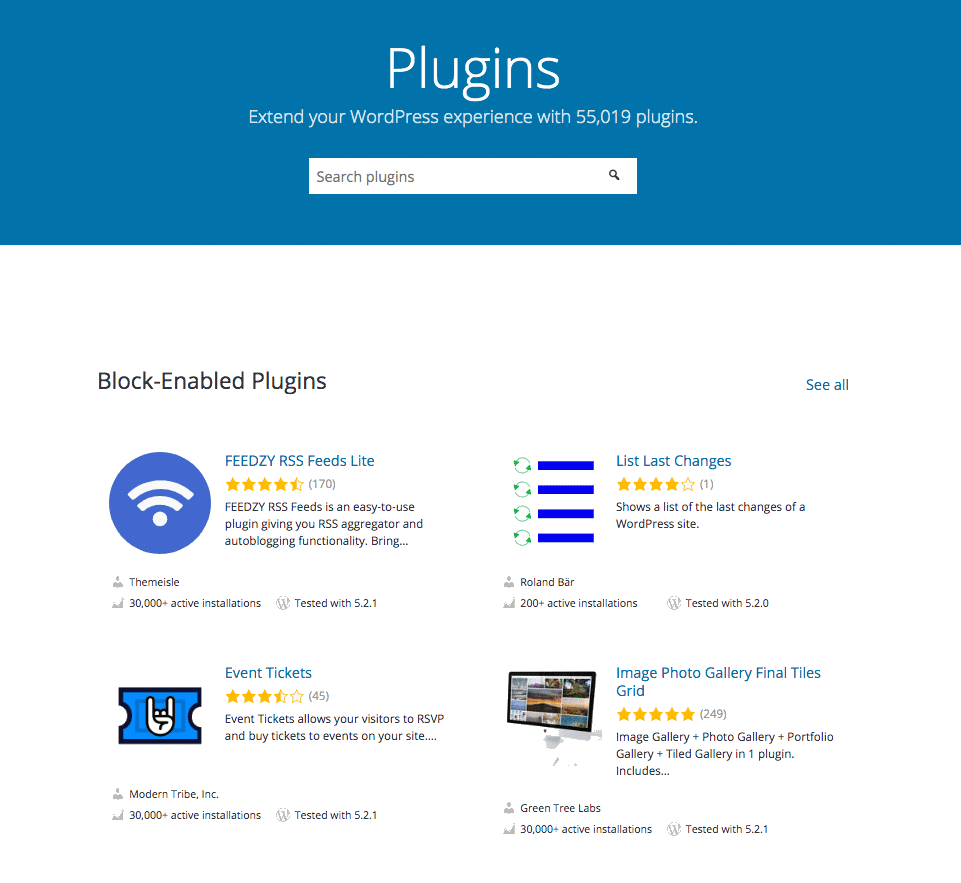 WordPress Plugin Directory: search and install any feature in seconds - no dev required, no code
This is a double-edged sword: the same enormous plugin ecosystem creates most of the security risk. But from a regular user’s perspective, it’s an unbeatable advantage. Instead of hiring a developer to build custom features (expensive, slow, risky), you install a plugin, configure it, done.
Gutenberg and Full Site Editing - WordPress Is Catching Up
Many people still picture WordPress with the clunky, rigid 2003-era editor. That’s no longer accurate. Since WordPress 5.0 (2018) with the Gutenberg block editor, and especially Full Site Editing (FSE) from WordPress 5.9 (2022), users can customize their entire website layout - header, footer, templates - directly in the browser without touching code.
 WordPress Site Editor (FSE): the Design sidebar lets you control Navigation, Styles, Pages, Templates, and Patterns - no code required
It’s still not as elegant as Webflow or Framer. But it’s good enough for 90% of real-world use cases that regular users actually have.
WordPress vs. Alternatives - When Should You Switch?
WordPress isn’t the right choice for everyone. This table helps you decide:
| Situation | Best choice |
|---|---|
| Personal blog, portfolio, SME website without a dev | WordPress |
| Small to mid-size e-commerce | WordPress + WooCommerce |
| High-performance website, strong SEO focus, team has devs | Astro / Next.js + Headless CMS |
| Marketing landing pages, rapid A/B testing | Webflow / Framer |
| SaaS product site with heavy integrations | Next.js + Sanity/Contentful |
| Need a live website in hours, no dev available | WordPress or Squarespace |
The real question isn’t “is WordPress good or bad?” It’s “does my team have a developer, and how much SEO infrastructure am I willing to build from scratch?”
The Real Cost of Leaving WordPress
When a developer says “you should leave WordPress,” they’re usually right on a technical level. Modern stacks like Astro and Next.js with headless CMS deliver better performance, better security, and better developer experience.
But they routinely undercount the real cost of building your own SEO infrastructure:
- Sitemap must be configured and maintained manually
- Hreflang tags must be passed per-page - easy to miss, hard to audit
- Schema markup requires hand-written JSON-LD per component
- Sitemap pings to search engines need a separate deploy webhook
- SEO health dashboards require Google Search Console API integration
With WordPress, all of this works out of the box after installing Yoast or RankMath. With a self-built stack, you pay in developer time - and if you miss a step, Google will tell you about it weeks later via Search Console.
Nothing is free. WordPress charges in security risk and performance ceiling. Modern stacks charge in setup time and complexity.
Frequently Asked Questions (FAQ)
Is WordPress actually less secure than other CMSs?
Not inherently. WordPress core is well-maintained and patched quickly. Security problems mostly stem from low-quality plugins, nulled (cracked) themes, and cheap hosting with poor configuration. With reputable plugins, regular updates, 2FA enabled, and quality hosting - WordPress is completely secure for the vast majority of real-world use cases.
Is WordPress good for SEO?
Yes, and actually quite good when using the right plugins. Yoast SEO and RankMath automatically handle sitemap generation, schema markup, hreflang tags, canonical URLs, and surface an SEO error dashboard directly in the admin. This is why many content marketers and bloggers still choose WordPress over modern alternatives.
When should you leave WordPress?
When your team has developers, the site needs high performance (strict Core Web Vitals), you need to distribute content across multiple channels (web + app + email), or you need complex API integrations. At that point, a Headless CMS paired with a modern framework will give you more value than the initial setup cost.
WordPress is slow - does that hurt SEO?
Yes. WordPress with many heavy plugins and shared hosting tends to have high TTFB (Time to First Byte) and slow LCP (Largest Contentful Paint) - directly impacting Core Web Vitals that Google uses as a ranking signal. However, with proper caching (WP Rocket, LiteSpeed Cache), a solid CDN, and quality hosting, WordPress can absolutely achieve green Core Web Vitals scores.
Will WordPress die anytime soon?
There’s no sign of that. A 43% market share and a massive community create a network effect too large to disrupt in the short term. WordPress won’t “die” - it will continue being the default choice for non-technical users while developers and technical teams gradually migrate to modern stacks. The two worlds will coexist for the foreseeable future.
Summary
WordPress is old, heavily attacked, and not the best technology available - but it remains the #1 choice because it solves the right problem for the largest audience: launch a website fast, manage content without a developer, and get SEO working immediately through plugins. If you’re choosing between WordPress and a modern stack, the question isn’t which is better technically - it’s whether your team can build and maintain SEO infrastructure from scratch. If yes, migrate. If not, WordPress remains the most pragmatic choice on the market.