
How to Reduce AI Token Usage
Every message you send to an AI costs tokens - either money on a pay-per-use API, or quota on a subscription plan. Token is the billing unit for AI, and if you don’t understand how it works, you end up burning through your allowance on things that don’t need to be there. This guide breaks down the mechanics and gives you 13 practical ways to work more efficiently without sacrificing output quality.
Whether you’re using Claude, ChatGPT, or Gemini - they all charge by the token. The problem is most people only think about what they type. In reality, the system prompt, your entire conversation history, any files you attach, and even the AI’s internal “thinking” process all consume tokens quietly in the background.
Is this guide for you? If you’re still well under 50% of your daily quota, you probably don’t need to worry about this yet - just use AI freely. But if you’re consistently hitting 70%+ usage during your workday, adding automation routines, taking on more clients, or watching your AI workload grow exponentially - token optimization isn’t just about being frugal. It’s a skill worth building before it becomes a real bottleneck.
What Is a Token and Why Does It Matter?
A token is the smallest unit an AI processes - not a word, not a character, but a chunk of text. The common rule of thumb: 1,000 tokens equals roughly 750 words in English (other languages like Vietnamese or Japanese often use more tokens per equivalent meaning due to character structure).
A context window is the total number of tokens an AI can “see” in a single processing pass - including both input and output. Exceed this limit and the AI starts forgetting the beginning of your conversation.
 The context window is the AI’s “field of view” - anything outside it gets forgotten
Here’s what most people miss: AI re-reads your entire conversation history on every single message. A 100-message chat means the AI processes the full thread 100 times. That’s why long conversations get expensive fast.
Real API Pricing: What Tokens Actually Cost
Understanding pricing is the first step to managing it. Providers charge by $ per million tokens (MTok), billed separately for input and output.
 Anthropic API pricing - knowing your model tiers helps you match the right model to the right task
Claude pricing (2026):
| Model | Input ($/MTok) | Output ($/MTok) |
|---|---|---|
| Claude Haiku 4.5 | $1.00 | $5.00 |
| Claude Sonnet 4.6 | $3.00 | $15.00 |
| Claude Opus 4.7 | $5.00 | $25.00 |
| Claude Opus 4.7 Fast Mode | $30.00 | $150.00 |
For comparison - OpenAI:
| Model | Input ($/MTok) | Output ($/MTok) |
|---|---|---|
| GPT-5.4 | $2.50 | $15.00 |
| GPT-4o mini | ~$0.15 | ~$0.60 |
Real-world numbers: Anthropic reports an average of ~$13 per developer per active workday, and $150-250 per month for enterprise teams. 90% of users stay under $30/day. But nothing stops you from blowing past those numbers if you’re not paying attention.
The hidden cost nobody mentions: Output tokens cost 3-5x more than input tokens. A long answer is far more expensive than a long question. And extended thinking - the AI’s internal reasoning before it responds - is billed as output tokens and can consume tens of thousands of tokens per request.
What’s Actually Eating Your Tokens?
Beyond the messages you type, every session also loads:
- System prompt: ~4,200 tokens, auto-loaded every session
- Full conversation history: Every new message = the AI re-reads ALL of it
- File attachments: PDFs, images, documents - especially costly if sent raw without preprocessing
- Custom instructions / CLAUDE.md: Loaded into context every session, whether relevant or not
- MCP tool schemas: Tool definitions take up context space
- Extended thinking: Silent reasoning tokens billed as output
Token-Saving Tips - For Everyday Users
1. Convert PDF/DOCX to plain text before sending
PDFs carry metadata, font embedding, and formatting noise - all of which eat tokens without adding value. Instead of uploading the raw file:
- Copy just the relevant text and paste it directly
- Use ChatPDF or PDF2MD to convert to clean markdown first
- On Mac: open in Preview, select all, copy text
Same content, plain text is 30-60% lighter than the original PDF.
2. Only send the relevant section - not the whole file
Instead of: “Here’s my 50-page report, can you analyze it?” Do this: Paste the relevant section (pages 12-15) + your specific question.
3. Create a “Context File” for recurring projects
Instead of re-explaining your situation at the start of every new chat, keep a ready-to-paste file:
# Context - [Project Name]
## Who I am: [Role, company, position]
## Project: [Goal, constraints]
## Output style: [bullet points / formal / casual]
## Last session: [What was done, what's pending]
Paste this at the top of each new chat. Saves 10-20 messages worth of re-explanation every single time.
4. Save AI output as a markdown log file
At the end of every important session:
“Summarize everything we worked on today into a short markdown file I can reuse next time.”
Save that file. Next session, paste the summary instead of explaining from scratch. Cost difference: ~500 tokens vs 5,000 tokens of re-briefing.
I wrote a more detailed guide on how to set this up automatically - including having the AI save session logs to your local drive: Optimize AI Chat History: Auto-Save Session Logs, Preserve Context, and Cut Token Costs.
5. Start a new chat when switching topics
A 200-message marketing chat followed by one HR question means the AI reads 200 irrelevant messages before answering. One topic per chat.
6. Write specific prompts and cut the filler
| Instead of | Use |
|---|---|
| ”Could you help me with…” | Get straight to the request |
| ”As you know from our previous conversation…” | Paste your context file |
| ”Please think carefully and…” | Drop it - the AI already does |
| ”Thanks, now could you…” | Drop the pleasantries |
Also specify your output format upfront: “Return 3 bullet points, one line each” - the AI won’t generate unnecessary text.
7. Reset a long chat with a summary
When a conversation has grown too long:
- Ask the AI: “Summarize this entire conversation in 10 bullet points”
- Copy the summary
- Open a new chat and paste the summary
- Continue from there
From 50,000 tokens of history down to ~500 tokens of compressed context.
Token-Saving Tips - For Developers / Claude Code
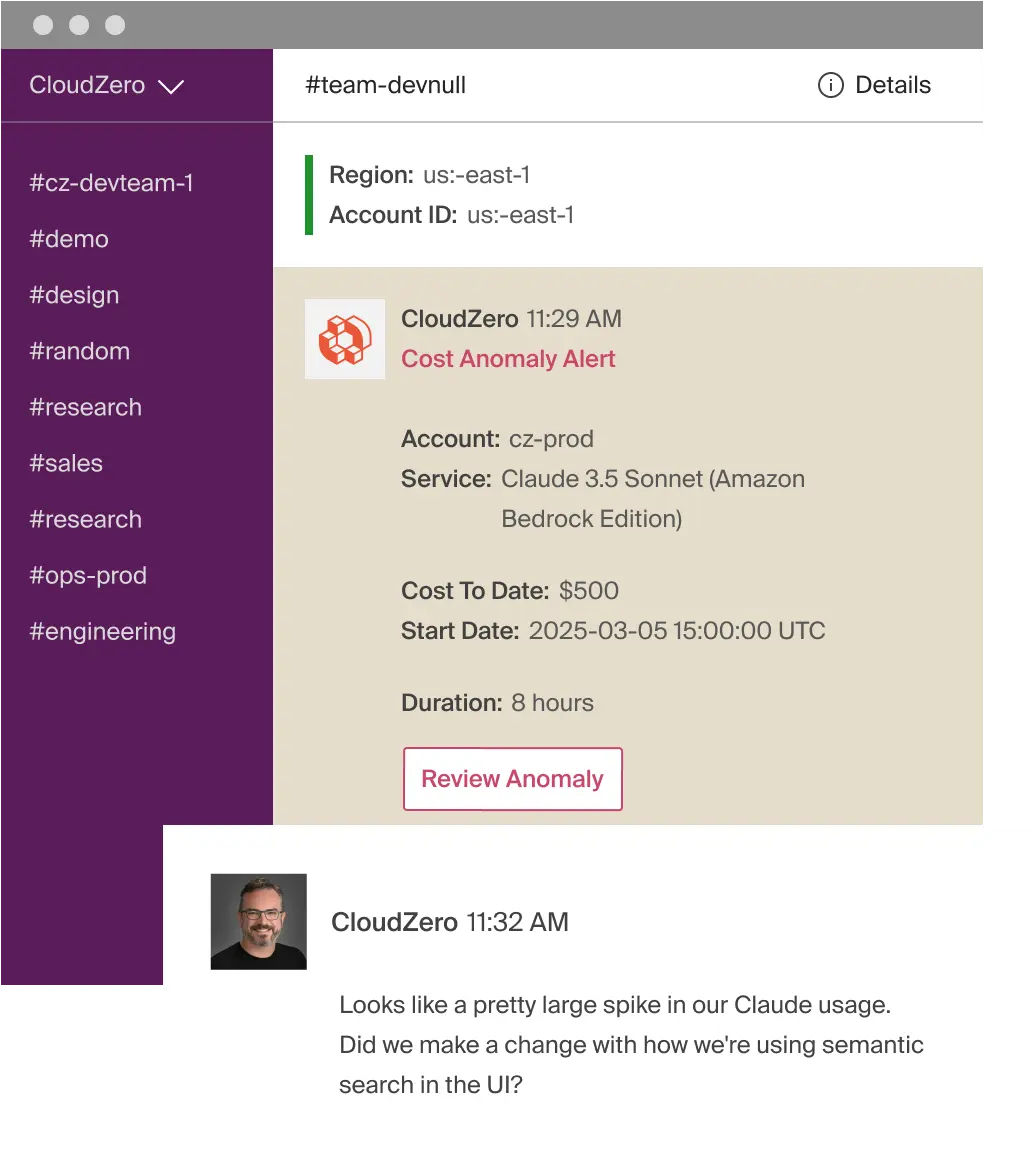 A real-world cost spike: $500 in 8 hours on Claude API - what happens without token controls in place
8. /clear between tasks
Stale context from unrelated work is pure waste - it’s re-read on every new message. Use /rename to save the session with a meaningful name first, then /clear to start fresh.
9. Use Plan Mode before writing code
Press Shift+Tab to enter Plan Mode - the AI maps out an approach and waits for your approval before touching any code. This prevents the expensive “wrong direction - undo - redo” loop. If the AI starts going off track: hit Escape immediately.
10. Match the model to the task
| Task | Model to use |
|---|---|
| Simple questions, formatting, grep | Haiku |
| Most coding work | Sonnet (default) |
| Architecture decisions, complex reasoning | Opus |
Use /model to switch mid-session. The price gap between Haiku and Opus is 25x on input, 5x on output.
11. Reduce or disable Extended Thinking for simple tasks
Extended thinking is on by default and can burn tens of thousands of tokens per request. For straightforward tasks:
MAX_THINKING_TOKENS=8000   # Reduce the thinking budget
# or: /effort low within the session
# or: disable it in /config
12. Keep CLAUDE.md under 200 lines - move workflows into Skills
CLAUDE.md loads entirely into context at the start of every session regardless of what you’re working on. Skills only load when explicitly called. Move specific workflow instructions (PR reviews, DB migrations…) into skills and keep CLAUDE.md for only the essentials.
13. Use hooks to filter data before the AI reads it
Instead of letting the AI wade through a 10,000-line log file:
# Pre-filter with a hook: from 50,000 tokens down to a few hundred
cmd 2>&1 | grep -A 5 -E "(FAIL|ERROR)" | head -100
Preprocessing is the highest-leverage move for data-heavy tasks.
Frequently Asked Questions
How much text is 1 million tokens in practice?
About 750,000 words in English - roughly 3-4 average novels. At Claude Sonnet 4.6’s price of $3/MTok for input, 1 million input tokens costs $3. That sounds cheap, but output tokens are 5x more expensive ($15/MTok), and in practice you’re sending and receiving many times per session.
Do subscription plans (Claude Pro/Max) still care about token usage?
Yes. Subscriptions have usage rate limits measured over time windows. Burn through tokens quickly and you’ll get throttled - slowed down or temporarily paused - earlier in your day. The optimization tips in this guide apply equally to subscription plans and pay-per-use API.
How many tokens does an image use?
It depends on the resolution and model. With Claude, a 1080p image can cost 1,500-2,000 tokens just to process. If you’re sending an image so the AI can read text in it, it’s more efficient to crop to just the text area, or run OCR first and paste the extracted text instead.
What is prompt caching and how much does it save?
Prompt caching lets you cache fixed parts of your system prompt or context - repeated calls to that cached content cost only 10% of the normal price. Anthropic’s cache hit discount is 90%. This feature is primarily useful for developers building apps with repeated system prompts, rather than individual end users.
Summary
Tokens are money, and most of them get wasted on things that don’t need to be there: long conversation histories, raw files sent without preprocessing, vague prompts that trigger broad scanning, and premium models used for tasks a cheaper model handles just as well. The two highest-impact changes you can make right now: create reusable context files (cuts re-explanation overhead) and start fresh chats per topic (stops the AI from re-reading irrelevant history). Apply the habits in this guide and you can realistically cut token usage by 30-60% without any drop in output quality.
Related
- Context in AI: The Key to Turning Your AI from a Stranger into a Real Collaborator
- Optimize AI Chat History: Auto-Save Session Logs, Preserve Context, and Cut Token Costs
- Structured Prompting: The RTFC Framework for Better AI Output
- Claude Projects: The AI Workspace That Remembers Your Context
- ccusage and codeburn: Track Your Claude Code Usage and Costs