 NateCue
MCP (Model Context Protocol): The Open Standard Connecting AI to the Real World
MCP stands for Model Context Protocol - an open standard introduced by Anthropic in 2024 to solve the largest practical problem in modern AI: how do you connect an AI model to any tool or data source in a consistent, secure way? If you are building AI agents or simply want to understand how Claude can read your GitHub or Notion, this is the article for you.
Before MCP, connecting an AI application to any external tool meant writing a custom integration from scratch. Add a new tool, write more custom code. The result was fragmented systems that were hard to maintain and impossible to reuse across different AI platforms. MCP was built to solve exactly this: instead of N x M custom integrations (N models times M tools), one standard handles everything.
What MCP Is
MCP (Model Context Protocol) is an open-source communication standard released by Anthropic in November 2024. Its purpose is to standardize how AI applications connect to external data sources and tools.
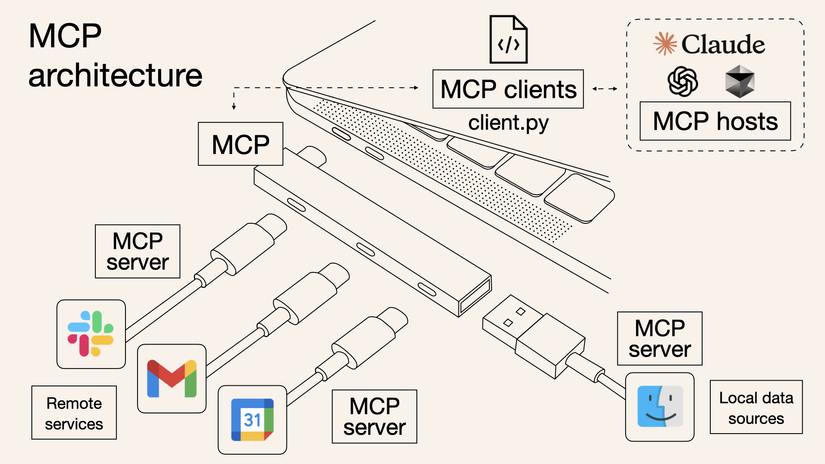
The clearest analogy: MCP is USB-C for AI. Before USB-C, every device had its own connector - one for laptops, one for phones, one for headphones. USB-C unified them all under one standard. MCP does the same for AI: whether you are using Claude, ChatGPT, or any other model, the tool only needs to support MCP to work with any of them.
Technically, MCP uses JSON-RPC 2.0 as its transport protocol - a well-established standard in distributed systems that ensures broad compatibility and good scalability.
By early 2025, OpenAI had integrated MCP into their Agents SDK and ChatGPT Desktop, and Google DeepMind confirmed Gemini support. In December 2025, Anthropic transferred MCP governance to the Linux Foundation - a clear signal that this is no longer one company’s standard, but a genuine industry foundation.
How MCP Architecture Works
MCP follows a client-server model with three main components:
MCP Host
The AI application that the user directly interacts with. Classic examples: Claude Desktop, VS Code with Copilot, Cursor, Windsurf. The Host is responsible for initializing and managing connections to all MCP Servers, while coordinating the information flow between the AI model and external tools.
MCP Client
A component inside the Host that manages the connection to one specific MCP Server. A single Host can run many Clients in parallel - each Client connected to a different Server.
For example: VS Code simultaneously maintains connections to a Filesystem Server, a Database Server, and a Sentry Server through three independent Clients. When the AI needs to read a file, it goes through the Filesystem Client; when it needs to check a production error, it goes through the Sentry Client.
MCP Server
A program that exposes data and functionality to AI through the MCP protocol. Servers can run in two ways:
- Local Server: Runs on the same machine as the Host, communicates via
stdio(standard input/output). High performance, no network overhead. Examples: Filesystem Server, SQLite Server. - Remote Server: Runs on the internet, communicates via HTTP with Server-Sent Events. Supports OAuth and API key authentication. Examples: Sentry MCP Server, official GitHub MCP Server.
+------------------------------------------+
|       MCP Host (VS Code, Cursor...)      |
|  +----------+  +----------+  +--------+  |
|  | Client 1 |  | Client 2 |  | Client |  |
|  +----+-----+  +----+-----+  +---+----+  |
+-------|-----------|-----------|-----------+
        |           |           |
   +----v------+  +-v--------+  +-v----------+
   |  Filesys  |  | Database |  | Sentry.io  |
   |  (local)  |  | (local)  |  |  (remote)  |
   +-----------+  +----------+  +------------+
The Three Primitives: The Common Language Between AI and Tools
This is the most important part for understanding what MCP actually enables. Each MCP Server can provide up to three types of “primitives” to the AI:
Tools - Actions the AI Can Take
Tools are functions the AI can call to perform a specific task. This is a model-controlled primitive - the AI decides when to call which tool based on conversational context, similar to how a developer decides which function to use.
Real-world examples:
read_file- AI reads a file from the filesystemquery_database- AI queries a database with SQLcreate_calendar_event- AI creates an event directly in Google Calendarsearch_code- AI searches for code across an entire repository
Resources - Contextual Data
Resources are data sources that the application provides to AI as background context. Unlike Tools (which are actions), Resources are static information - for example, a database schema, technical documentation content, or a list of available tools.
Prompts - Reusable Templates
Prompts are predefined templates that are user-controlled - users can invoke them when needed. For example, an MCP Server for code review might include a built-in prompt: “Review this PR against OWASP Top 10 security criteria” - so you never have to type that instruction from scratch.
Why MCP Matters: The Real Benefits
Write once, use everywhere. A single MCP Server for GitHub works with Claude, ChatGPT, Cursor, or any MCP-compatible host - no separate integration for each AI. This is the biggest advantage over previous approaches.
Massive existing ecosystem. Thousands of MCP Servers already exist, built by the community and major companies - covering Filesystem, GitHub, Slack, Notion, PostgreSQL, Kubernetes, and much more. You do not have to build from scratch.
Standardized security. MCP has clear authentication mechanisms at the transport layer (OAuth, Bearer token, API key), rather than each integration handling security differently and potentially introducing vulnerabilities.
The foundation for real agentic AI. When AI has access to the right tools through MCP, it does not just answer questions - it takes action: books appointments, writes code, sends emails, updates databases. This is the prerequisite for building genuinely autonomous AI agents.
Significant developer time savings. Instead of spending weeks on custom integrations, you can integrate an MCP Server in hours using SDKs available for Python and TypeScript.
MCP in Practice: Notable Use Cases
AI-assisted programming: Cursor and VS Code Copilot use MCP so AI can simultaneously read code, look up errors from Sentry, and create PRs on GitHub - all in a seamless workflow with no copy-pasting between tools.
A real personal assistant: Claude Desktop connects to Google Calendar and Notion via MCP, becoming an assistant that actually knows your real schedule and can create notes in the right workspace. This is the difference between AI that “knows about Notion” and AI that “can work inside your actual Notion.”
Enterprise deployment: Internal chatbots connecting simultaneously to multiple databases, CRM systems, and internal documentation through MCP - no need to write separate connectors for each source, with security controlled centrally.
Design to code: Claude Code reads design from Figma via MCP and generates matching React/CSS code directly - minimizing the manual “translation” step from design spec to implementation.
MCP vs. Traditional Approaches
| MCP | Custom Integration | RAG | |
|---|---|---|---|
| Action capability | Yes (Tools) | Yes | No |
| Standardization | High | Low | Medium |
| Cross-platform reuse | High | Low | Medium |
| Real-time data | Yes | Yes | No |
| Implementation complexity | Low (with SDK) | High | Medium |
| Standardized security | Yes | Varies by team | No |
Context in AI remains the foundation - MCP is the mechanism for delivering that context to AI from external sources in a systematic and secure way.
FAQ
Is MCP controlled exclusively by Anthropic?
No. While Anthropic created MCP in November 2024, in December 2025 they transferred it to the Linux Foundation through the Agentic AI Foundation (AAIF). MCP is now an independent open standard governed collectively by the community and major companies - similar to how Linux or Kubernetes is managed.
Do OpenAI and Google support MCP?
Yes. OpenAI integrated MCP into their Agents SDK, Responses API, and ChatGPT Desktop in March 2025. Google DeepMind confirmed MCP support in Gemini in April 2025. This confirms MCP is becoming a genuine industry standard - not a proprietary format owned by any single company.
How do I start using MCP with Claude Desktop?
Claude Desktop supports MCP out of the box. You only need to edit the claude_desktop_config.json configuration file to declare which MCP Servers you want to connect. Anthropic and the community provide ready-made servers for Filesystem, GitHub, Brave Search, PostgreSQL, Notion, and more. See the full list at modelcontextprotocol.io/servers.
How is MCP different from standard Function Calling?
Function Calling is a model-level feature that allows calling functions defined within a prompt. MCP is a higher-level, model-agnostic layer: it standardizes how tools are discovered, connected, and called from any model, through a protocol with lifecycle management and multi-server support. MCP uses Function Calling underneath, but adds automatic discovery, connection management, and concurrent multi-server support on top.
Do I need to code to use MCP?
To use existing MCP Servers: minimal coding required - mostly editing a JSON config file. To write a new MCP Server from scratch: basic coding skills are needed, with Python and TypeScript having the best SDK support. Anthropic provides detailed documentation with practical examples at modelcontextprotocol.io/docs.
Summary
MCP is an important step in transforming AI from a passive chatbot into an active agent that can connect to and act in the real world. With support from OpenAI, Google, Microsoft, and thousands of community developers, the Model Context Protocol is on track to become the universal language for AI tool integration. If you are building AI workflows or want to maximize the capability of your AI assistant, understanding MCP is not optional.