
When I first tested html-anything, all I had was a text snippet about avoiding credit card interest traps. No images, no design assets, no Canva template open anywhere. I pasted that text into the tool, cycled through 12 different templates, and hit generate. In under 30 minutes, I had 12 HTML files that looked completely different from each other - warm magazine editorial, dark terminal aesthetic, blueprint deck, LinkedIn carousel. Same input. Not a single word changed.
That was the moment I understood what html-anything is actually doing - and why it’s worth trying.
How html-anything works
The tool is built on open-design - essentially a UI layer and skill system that sits on top of whatever AI CLI agents you already have installed. Instead of interacting with Claude Code through a terminal, you open a browser at localhost:3000, pick a template from a library of 75 skills, paste your content in, and let the agent generate HTML with a live preview. The key difference is that the tool doesn’t need its own API key - it piggybacks on the Claude Code session already logged in on your machine, which means near-zero extra cost if you already have a subscription.
The underlying mechanism is straightforward: when you hit Generate, the server sends your content along with the skill’s system prompt to Claude Code via stdin/stdout. The agent processes it and returns HTML as a JSON-line stream - the tool parses that stream and updates the iframe preview in real time. You can cancel mid-generation if the output starts going the wrong way, then regenerate with a different template. No deploy step, no build process - the output is a standalone HTML file you download and use immediately.
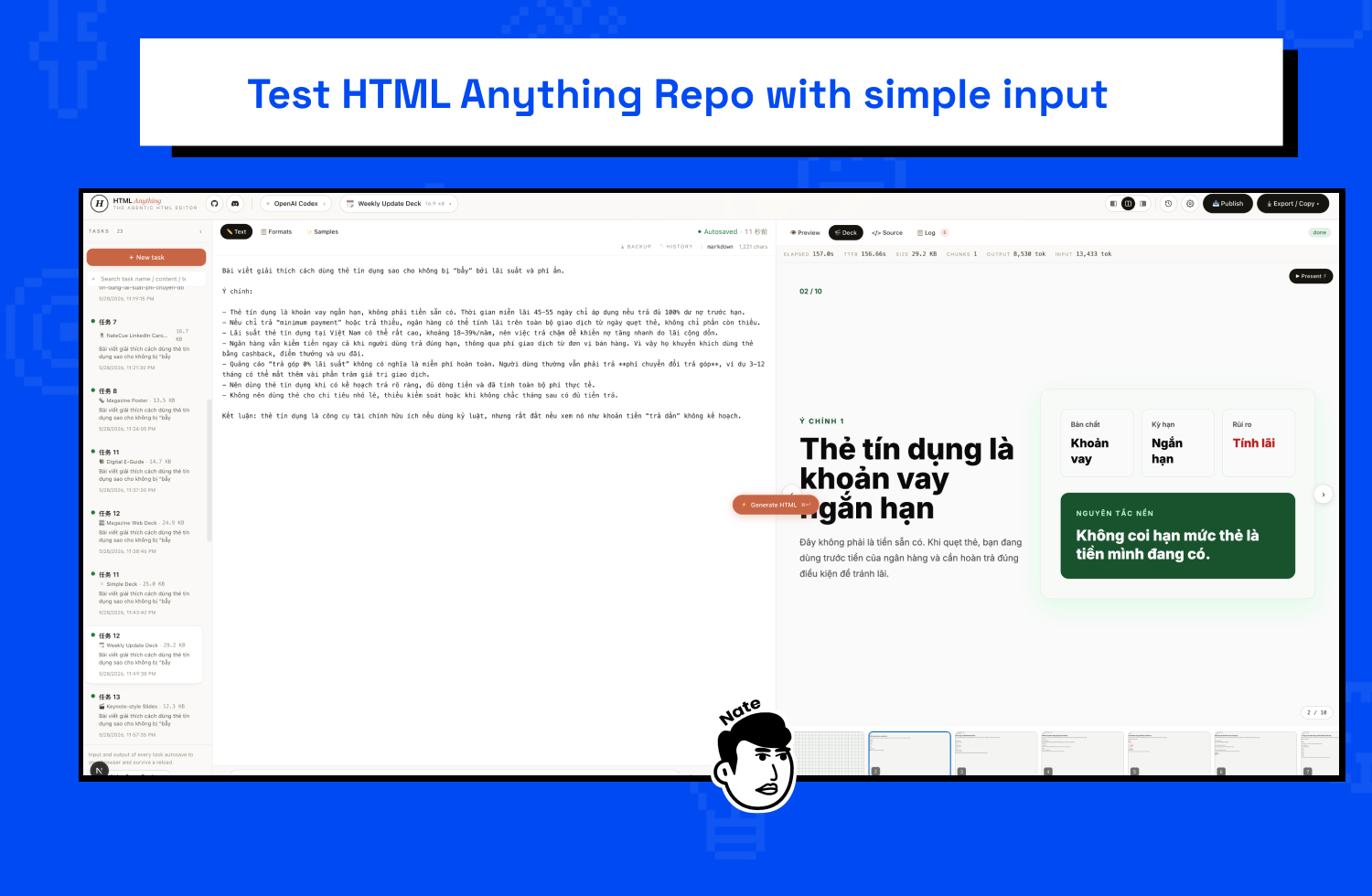
The html-anything interface: template list on the left, real-time HTML preview in the center, info panel on the right. The input used in this test was an article about credit cards.
Same input - 12 different visual outputs
This was the part I found most interesting to test. Instead of using placeholder content, I used a real explanation about credit cards - long enough, clearly structured, and definitely not the kind of technical content that’s easy to format automatically. Running it through 12 templates produced outputs that were completely different in both layout and visual feel: warm print-style editorial, developer-style terminal deck, military field manual aesthetic, hyperframes for video overlay.
You can explore them directly below - click each tab to see what every template produced from the same input:
If the iframe doesn’t load, open it directly here.
What I realized after comparing them: no template is objectively better than another - each one fits a different type of content and a different distribution channel. Magazine poster works for long educational pieces, terminal deck fits technical content, LinkedIn carousel is ideal for breaking insights into individual slides. Instead of needing design knowledge to pick the right layout upfront, you can generate multiple variants and choose later - this is a fundamentally different way of working compared to Canva or Figma.
Setup in 5 minutes
html-anything runs entirely local - no SaaS, no account, no cloud uploads. The only requirements are Node.js and pnpm. If you don’t have pnpm yet, npm install -g pnpm handles it, then:
git clone https://github.com/nexu-io/html-anything
cd html-anything
pnpm install
pnpm -F @html-anything/next dev
Open localhost:3000 and you’re ready to go. The tool auto-detects Claude Code via PATH and sets it as the default agent. If you have multiple CLI agents (Gemini, Cursor, Aider…), you can switch between them directly from the interface without any additional configuration.
I added a start.command file in the folder so I can double-click from Finder to launch it instantly - no need to remember the command every time:
#!/bin/zsh
export NVM_DIR="$HOME/.nvm"
[ -s "$NVM_DIR/nvm.sh" ] && source "$NVM_DIR/nvm.sh"
cd "$(dirname "$0")"
open http://localhost:3000 &
pnpm -F @html-anything/next dev
This beats an Automator app because it loads the correct nvm PATH, opens the browser automatically, and requires no extra steps. Next time you want to use it: one click, done.
Building custom skills for your own design system
The thing I like most about html-anything is that you can add your own templates just by creating a new folder inside src/lib/templates/skills/. No TypeScript to touch, no server restart needed - the dev server rescans automatically and the new template appears in the picker after a reload.
I built 3 skills based on the NateCue design system: card-natecue-social (1200x630 dark theme social card with brand blue #1585e7), card-natecue-carousel (LinkedIn carousel 1080x1080), and article-natecue (long-form article page). All three use Poppins font, dark background #050505, and accent colors from the brand book. Each skill took about 10 minutes to write - mostly describing colors, layout constraints, and content handling rules.
A basic skill looks like this:
---
name: card-natecue-social
en_name: "NateCue Social Card"
emoji: "🔵"
category: card
aspect_hint: "1200×630"
tags: ["natecue", "social", "branding"]
---

[Template: NateCue Social Card]
Generate a 1200x630 dark social card. Background #050505,
brand blue #1585e7 for accents. Font: Poppins from Google Fonts...
When you have your own design system, this capability becomes genuinely useful - not generating generic HTML, but HTML that’s already the right color, the right font, the right layout for your brand. Every time you paste text into a NateCue template, the output comes out on-brand by default.
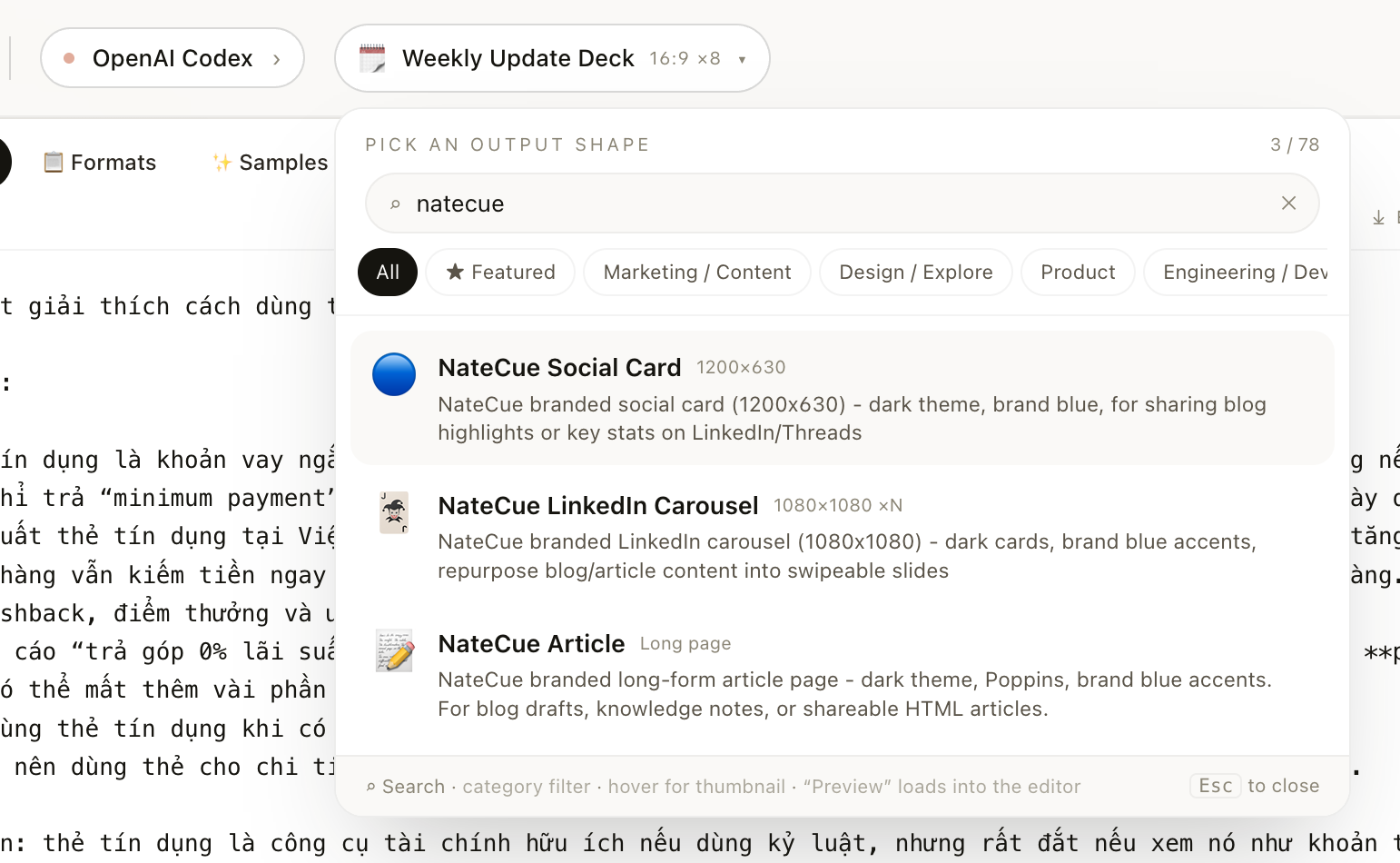
Template picker showing 3 custom NateCue skills (filtered by “natecue” from a library of 78 templates). The active tab is OpenAI Codex - demonstrating the ability to switch agents directly from the interface.
Honest assessment
The thing I find most valuable is multi-agent support. The tool doesn’t lock you into Claude Code - you can switch to Gemini CLI, Cursor Agent, or Aider from the same interface. When you want to try a different model for the same type of output, you don’t have to rebuild your workflow from scratch. This design approach is rare in tools of this type, and it makes html-anything a neutral layer across an increasingly diverse AI CLI ecosystem.
Standalone HTML output is also a genuine advantage when used in the right context. Every file is self-contained with all its CSS, fonts, and logic - no server dependency, works anywhere you copy it. For social cards or article previews meant for sharing, this is the ideal format.
The main limitation is that raw HTML output doesn’t plug directly into a CMS - you’ll need an additional conversion step if you want to embed it in WordPress or Webflow. And since it installs from source (no npm package yet), every update requires a manual git pull. Not a problem for developers, but real friction if you’re not comfortable with a terminal.
Who is this tool for?
If you’re already using Claude Code daily and regularly need to turn text into visual content - social cards, article previews, slide decks, data reports - html-anything is a reasonable addition with near-zero extra cost. Set it up once, use it whenever without opening Canva or Figma for every small output.
If you’re not comfortable with a terminal and don’t have Claude Code set up, the learning curve is steeper than the tool deserves. In that case, SaaS tools with visual template editors will serve you better. html-anything is clearly built for people already inside the CLI agent ecosystem - it’s not trying to replace Canva, it’s filling the gap between “I have text” and “I have a visual” with as little friction as possible.
Personally, I’ll use it mainly for two things: generating social cards from blog post highlights, and quickly creating HTML article previews to embed in demos. Both are repetitive tasks that used to take significantly longer.
What do you use to create visual content quickly from text? I’m curious if there’s a better workflow out there - drop a comment or reach out on LinkedIn.
Thanks for reading NateCue Insights!