
Measuring AI Traffic in GA4: A Step-by-Step Guide to Building Your GEO Visibility Report
When ChatGPT starts sending visitors to your website - do you actually know?
That question sounds odd, but it is the reality playing out across a huge number of websites in 2026. Someone asks ChatGPT, Perplexity, or Gemini something, the AI cites your website, and traffic flows back to you. This is called AI Referral Traffic - and it is growing faster than most people realize.
The problem is: GA4 does not automatically classify these traffic sources clearly. If you do not build a dedicated report yourself, traffic from ChatGPT or Perplexity quietly gets buried inside your generic “Direct” or “Referral” bucket and you never find out.
In this post I will walk you through building a GA4 Exploration report specifically designed to track AI traffic - the first and most important step toward measuring your own GEO (Generative Engine Optimization) performance.
What is GEO and why does measurement matter?
GEO (Generative Engine Optimization) is the set of techniques that help your content get cited and recommended by AI tools like ChatGPT, Perplexity, and Gemini when users ask them questions. Think of it as “SEO for the AI era” - instead of optimizing to rank on Google Search, you optimize to get AI to mention your brand.
To do GEO effectively, the first step is not optimizing your content. It is measuring where you currently stand.
Specifically, the report below will answer four questions:
- Which AI is driving traffic? ChatGPT, Perplexity, or Gemini?
- Which pages do AI visitors land on? What content is actually being cited?
- What is the traffic quality? Do they engage, or do they bounce immediately?
- Is it generating conversions or revenue?
Step-by-step: Building the AI Traffic report
Step 1 - Create a new Exploration
Go to Explore in the left menu of Google Analytics 4 and select Blank Exploration.
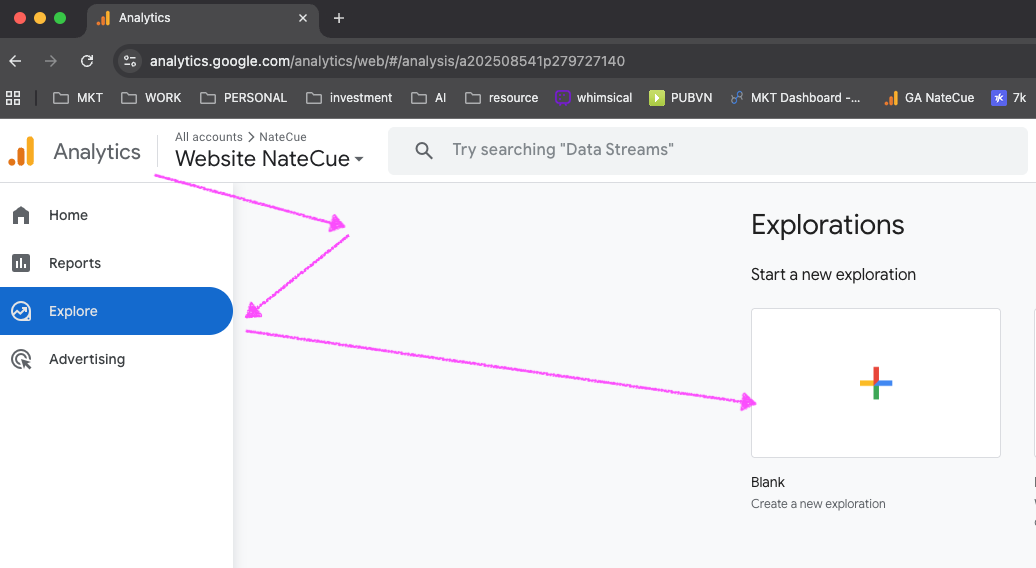
Name the report: AI Traffic Report (or GEO Visibility - [website name] if you manage multiple properties).
This becomes a dedicated workspace - completely separate from GA4’s default reports - where you can monitor all traffic arriving from AI tools.
Step 2 - Add Dimensions
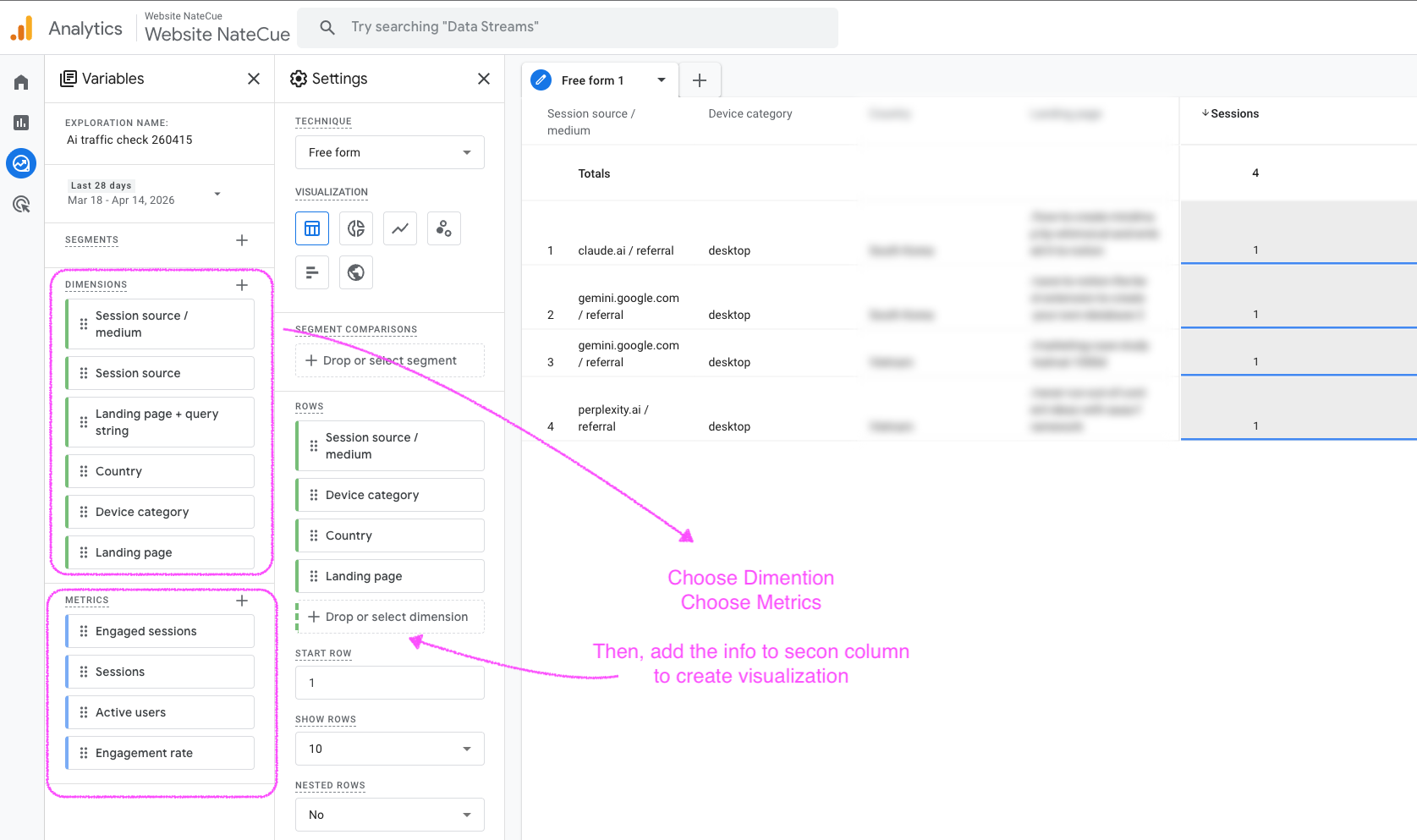
In the Variables column on the left, under Dimensions, click + and add the following fields:
| Dimension | Purpose |
|---|---|
Session source / medium | Full traffic source (e.g., chatgpt.com / referral) |
Session source | The referring domain |
Landing page + query string | The first page the user entered |
Session campaign | Campaign name if UTM tags are set |
Country | Geographic breakdown |
Device category | Desktop, mobile, or tablet |
Then drag Session source / medium into the Rows section - this will be the primary analysis axis.
If you want to drill deeper, drag Landing page + query string or Country into Rows in hierarchical order below it.
Step 3 - Add Metrics
Under Metrics, click + then add and drag the following into Values:
| Metric | What it tells you |
|---|---|
Sessions | Total visit sessions |
Users | Unique visitors |
Engaged sessions | Sessions with real interaction (viewed >10s or clicked) |
Engagement rate | Traffic quality indicator |
Conversions | Goal completions |
Total revenue | Revenue (if e-commerce tracking is set up) |
Once you have enough data, you will immediately see:
- Which AI drives the highest-quality traffic (highest Engagement rate)
- Which pages AI tools cite most often (highest Sessions)
- Whether AI traffic is generating real business value
Step 4 - Create a Filter to isolate AI Traffic
This is the most important step. Under Filters, configure:
- Dimension:
Session source - Condition:
matches regex - Value: Paste the following regex
chatgpt\.com|chat\.openai\.com|openai|perplexity\.ai|gemini\.google\.com|bard\.google\.com|copilot\.microsoft\.com|bing\.com|claude\.ai|anthropic|deepseekTechnical note: This is an alternation regex (using
|as a separator). Do not wrap the whole thing in[...]- in regex, square brackets define a character class that matches single characters, not entire domain strings. If your report is not returning the right data, this is usually the first thing to check.
Once the filter is set, the report will only show sessions from popular AI tools:
chatgpt.com / referral
perplexity.ai / referral
gemini.google.com / referral
copilot.microsoft.com / referral
claude.ai / referral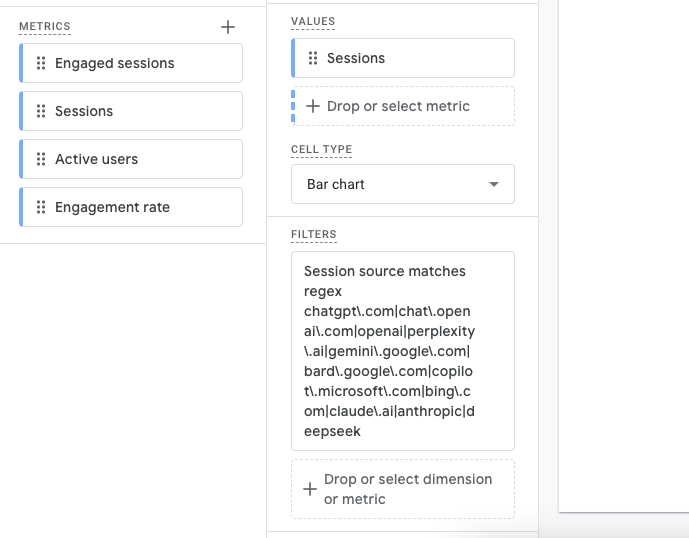
Reading the data and what to do next
Once the report has been running for a few weeks, you will start noticing interesting patterns. Here is how I read and use this data:
Identify which AI “favors” your website
Compare Sessions and Engagement rate across sources. ChatGPT usually leads in volume, but Perplexity tends to have a higher Engagement rate because users already have a clear intent before they click.
Find which content pages AI is citing
Drag Landing page + query string into Rows below Session source / medium. The pages that show up most are the content AI “trusts” enough to recommend - these are the posts you should keep investing in and updating regularly.
Compare quality against Organic Search
Build a similar Exploration filtered by Organic and compare Engagement rates side by side. AI traffic often has an Engagement rate equal to or higher than Organic - because users have already been “pre-qualified” by the AI before clicking through to your site.
Set up a regular review schedule
Save the report and check it weekly or monthly. If you notice a particular AI suddenly spiking in traffic, that is a signal your content is being indexed better by that AI - and you now have a concrete reason to investigate why.
Wrapping up
GEO is not just about optimizing content for AI to read - it is also about measuring how AI is talking about you and who it is sending your way.
This GA4 Exploration report is the starting point. Once you have the data, you have a real foundation for deciding which content to invest in next, which formats AI cites most often, and which AI aligns best with your audience.
Setup takes about 10 minutes. The insights you get could reshape your entire content strategy for the year ahead.
If you have already set this up, drop a comment and let me know which AI is leading traffic for your site - I am genuinely curious what the picture looks like across Marketing and Tech sites in Vietnam.
Thanks for reading NateCue Insights!