
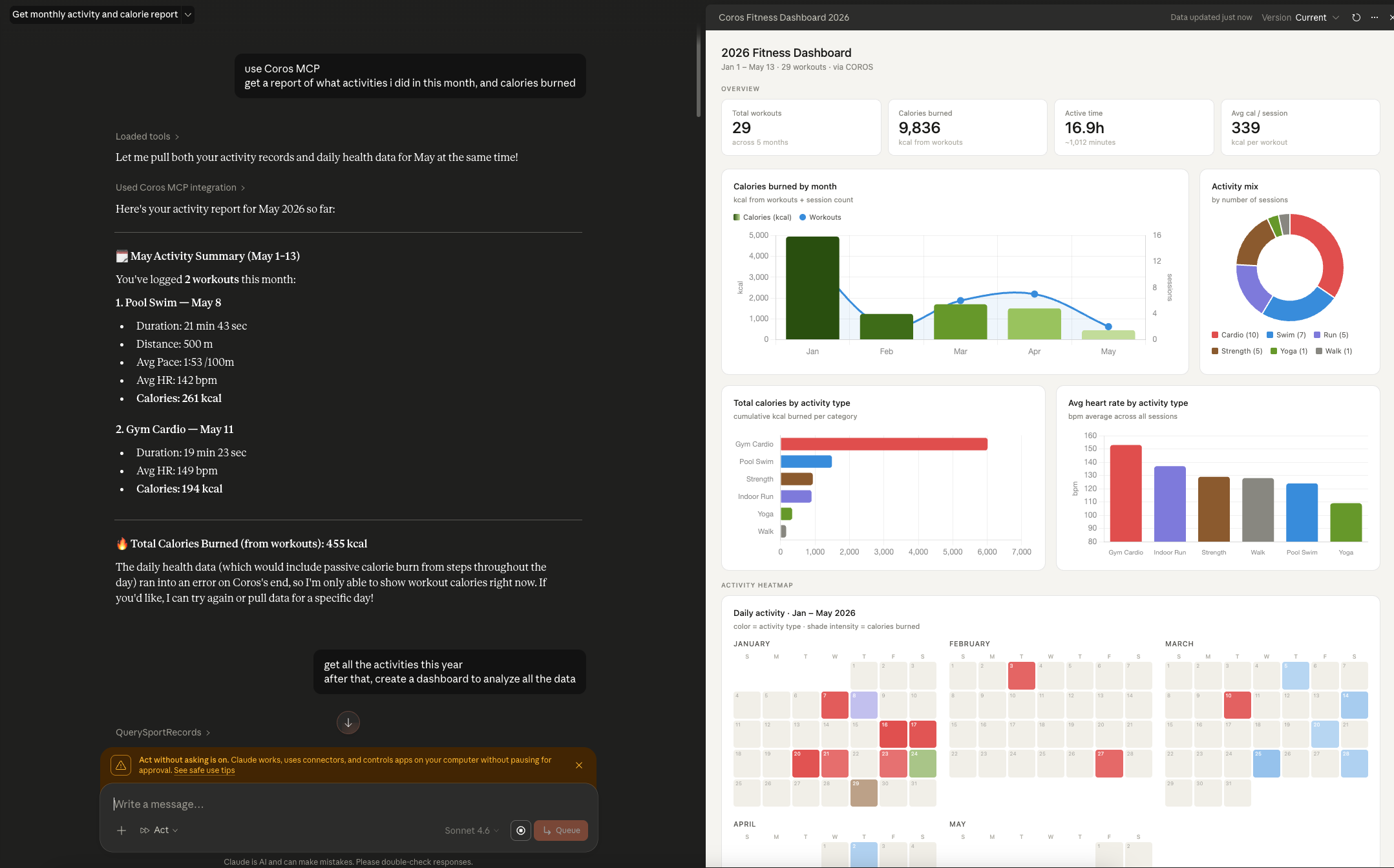
Coros just announced the official launch of their MCP server - the first time I’d heard of a sports watch brand proactively releasing an AI connectivity standard. I’m using a Coros Pace 3, I use Claude daily for work, and I already had a basic understanding of MCP. Those three things came together into one simple question: can I connect my watch to Claude and process my own training data? The answer is yes - and the first result was 9,836 kcal appearing on a dashboard I built myself, pulled from 29 workouts across the first five months of 2026.
What MCP Is and Why Coros Matters
If you’re not familiar with MCP yet, here’s the shortest version: MCP (Model Context Protocol) is an open connectivity standard that lets AI models like Claude “read” data from external apps and systems - rather than only processing what you manually paste into a chat. I have a full MCP explainer if you want to go deeper on how it works technically.
The interesting thing is that Coros isn’t the first brand in the fitness space to have MCP. Garmin, Apple Health, WHOOP, and Oura Ring all have MCP servers - but most were built by the developer community, not by the brands themselves. Coros is one of the first sports watch companies to officially release their own MCP server, complete with a dedicated endpoint and documentation maintained by the Coros team. That means a more stable connection, ongoing maintenance, and no need to run your own server.
Why I Wanted to Try This
I’ve been using the Coros Pace 3 - a mid-range running watch I switched to late last year. Worth saying upfront: the Coros app is already genuinely good. The built-in dashboard covers training load, recovery score, heart rate zones, weekly and monthly fitness trends - more than enough to analyze your training without anything extra. MCP isn’t here to fill a gap the app leaves behind.
So why try it at all? Mostly curiosity - the kind that asks “can I build a dashboard exactly the way I want, using real data from my watch?” Not because I needed to, but because I wanted to know how far I could take it. When Coros announced the MCP server launch, it was the right moment to find out.
Setup - 3 Steps
Coros MCP doesn’t require any technical skills. The whole process took around 5 minutes:
- Go to Settings → Integrations in Claude (or Claude.ai) and find the option to add a custom MCP connection. Name the connection
coros, then enter the MCP endpoint URL for your region - Coros provides separate endpoints for North America, Europe, and Southeast Asia. See the full endpoint details at the Coros MCP page.
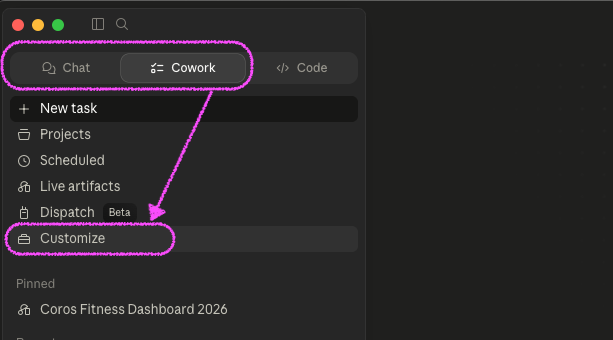
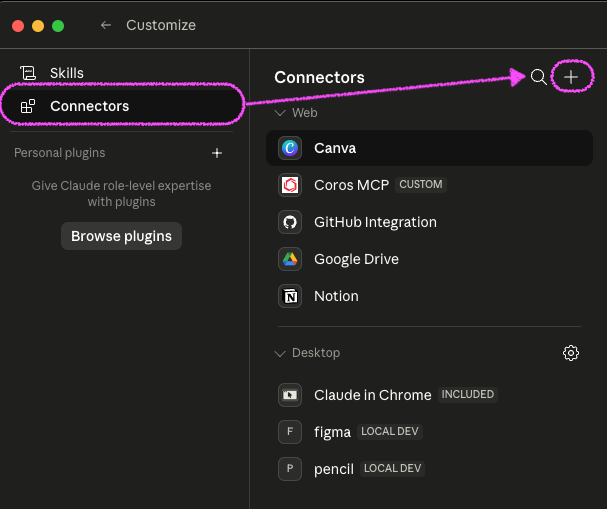

- After saving the connection, open Claude Chat (or Claude Cowork if you’re on a workspace plan) and type: “check Coros MCP connection”. Claude will try calling the API and report back. If you see a confirmation with your account info and activity count, the connection is live.
- Once confirmed, you’re ready to go.
The Prompt I Used to Build the Dashboard
This was the part I found most interesting. After connecting, Claude can answer natural-language questions about your training data. But instead of asking one thing at a time, I used a single comprehensive prompt to have Claude generate a complete HTML dashboard:
Based on my Coros training data from the start of this year through today, create a complete HTML dashboard including:
- 4 overview stats: total workouts, total calories, total active time, average calories per session
- Monthly calories chart combined with session count
- Activity type breakdown by number of sessions (pie chart)
- Total calories and average heart rate by activity type
- Daily activity heatmap for the year - color by activity type, shade intensity by calories burned
- Detailed workout log table with filter by activity type
- Key insights: most active month, highest-calorie single session, activity type with the largest share
Clean, minimal design using Chart.js, exported as a self-contained HTML file that runs in the browser.
Claude reads data from the Coros API via MCP, processes it, and returns the HTML file. Open it in a browser and it works immediately - no additional setup needed.
What I Actually Saw
When the dashboard first loaded, I sat with it for a moment before scrolling down. A few numbers were genuinely surprising.
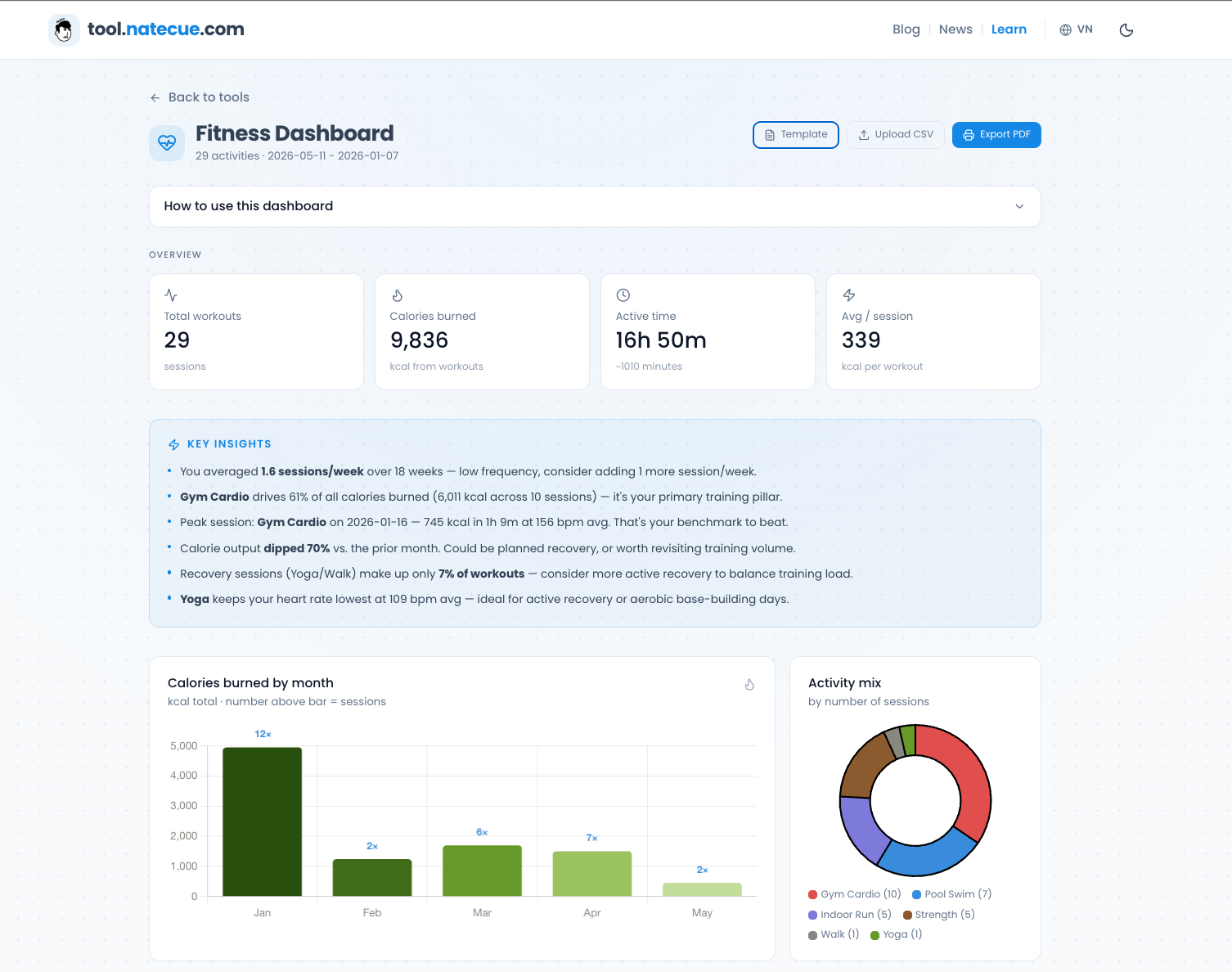
Gym Cardio turned out to be the dominant calorie burner, accounting for 61% of my total calories for the year - 6,011 out of 9,836 kcal. That’s not shocking on its own, but I didn’t expect the margin to be that wide compared to swimming, which I’d always thought of as my “main” workout. Pool Swim contributed 1,490 kcal from 7 sessions, while Cardio hit 6,011 kcal from just 10 sessions. Each Cardio session burns nearly twice what a swim does.
January was my most active month - 12 sessions and 4,944 kcal - nearly four times the pace of other months. Looking at that number, I immediately recognized the “New Year’s resolution” effect. After January, my training frequency settled to a steady 5-6 sessions per month, though calorie output per session stayed consistent. The single best session was January 16 - Gym Cardio, 1 hour 8 minutes, 745 kcal, average heart rate 156 bpm. I don’t remember which specific workout that was anymore, but the data speaks for itself.
Average heart rate by activity type also told an interesting story: Cardio led at 153 bpm, swimming came in at 124 bpm despite similar session lengths. Strength training averaged 129 bpm - higher than swimming - which I never would have felt during the session itself, since there’s no “running out of breath” sensation the way Cardio has.
A Ready-to-Use Dashboard - No Setup Required
The HTML dashboard I generated through Claude works well for my own use but isn’t easy to share or refresh every month. I took it one step further: I built a web dashboard at tool.natecue.com/fitness-dashboard that anyone can use with the following workflow.
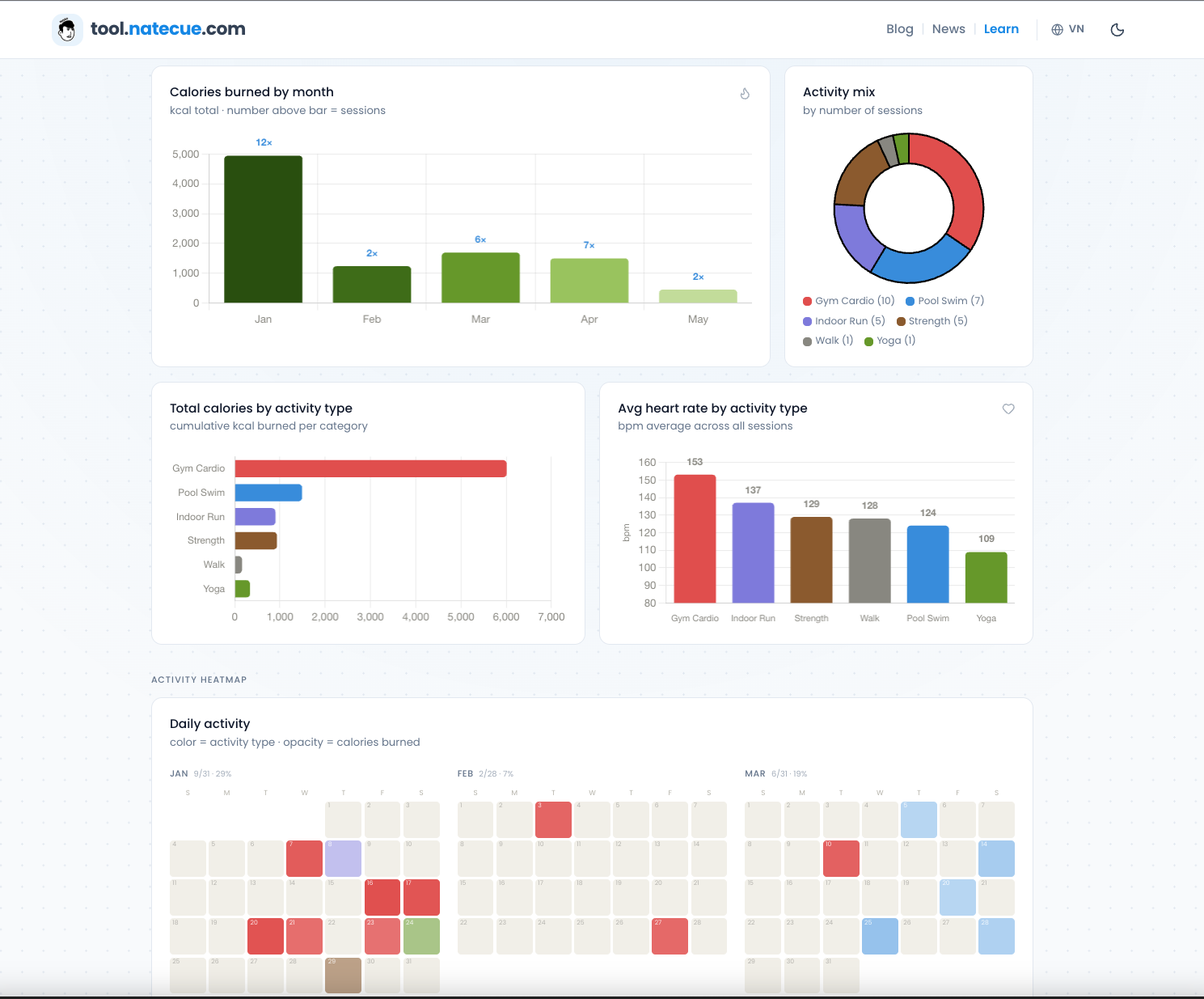
- Go to the dashboard and download the CSV template
- Open Claude (with Coros MCP connected), paste the CSV into the chat, and type: “Update this CSV with all my Coros training data from the start of this year through today. Add Key Insights covering my most active month, the activity type that burned the most calories, and my overall training trends”
- Claude reads data from Coros MCP, fills in the template, and returns the updated CSV
- Upload the CSV to the dashboard - charts and stats render automatically
- Download a PDF if you want to keep a local copy
One important note: all data processing happens locally in your browser - nothing is uploaded to any server. The CSV only exists on your machine and within your Claude session, so there’s no privacy concern.
What I Actually Got Out of This
After going through the whole process, I think Coros MCP’s real value comes from three things - none of which are “filling a gap the app left behind.”
The first is the brand-user relationship angle. A sports watch company officially releasing its own MCP server is a meaningful signal - they’re not just selling hardware and walking away, they’re actively creating a touchpoint with users through the AI ecosystem. As a user, the feeling is “this brand is tracking the right trends” - different from just shipping another in-app feature. It opens up a kind of interaction with the brand that simply didn’t exist before.
The second is the ability to synthesize data on your own terms. The Coros dashboard is comprehensive, but it shows data the way Coros designed it to be shown. MCP is different - you ask Claude in plain English, Claude reads your watch data, and returns exactly the angle you’re looking for, unconstrained by preset templates. Want to compare your performance this month against last using metrics you define yourself? You can. Want to know which sessions you pushed hard on low recovery days? That too.

The third - and the one I found most personally valuable - is practicing data skills with real data. That HTML dashboard isn’t just a nice output - it’s proof that I can connect a real data source, ask the right questions, and turn raw numbers into something meaningful. Anyone who cares about data analytics or AI tools knows the real differentiator isn’t the tool itself - it’s the ability to frame the right question. Coros MCP is a real-world training ground for exactly that, using a dataset that is literally my own life.
One last note: Coros MCP is currently read-only - Claude can’t create training schedules or modify plans directly inside the app. Coros has mentioned write capabilities for training plans on their future roadmap. When that lands, the use case gets considerably more interesting.
What watch are you using to track your training? And more honestly - do you actually go back and look at your data after each session, or like me, does most of it just sit there untouched? Drop a comment below.
Thank you for reading NateCue Insights!