

One morning I was drafting a brief for a campaign and asked ChatGPT to write a sample copy block. The result looked decent - smooth sentences, right structure. But the tone was completely off. I had to stop, re-explain the brand, the target audience, the voice the brand was using. AI rewrote it. Still not right. More explanation. By the time the brief was done, I had spent nearly 30 minutes just “re-teaching” AI things I already knew from the start.
That was when I realized the problem wasn’t that AI wasn’t smart enough. The problem was that AI was missing context. And which layer you’re on in the 4 levels of AI application is, fundamentally, about how deeply you’ve solved that context problem.
Framework: 4 Layers of AI in Your Work
When people talk about applying AI at work, most are thinking about the same thing - chatting with AI to get things done faster. But that’s only Layer 1 in a four-layer system, and each layer solves a different problem, with very different levels of complexity and results.
The four levels are:
- AI Copilot (Layer 1)
- AI Workflow Automation (Layer 2)
- AI Agent (Layer 3)
- and Agentic AI (Layer 4)
This breakdown isn’t about how “smart” the AI is - it’s about how you integrate AI into your actual workflow, and how deeply you’re solving the context problem.
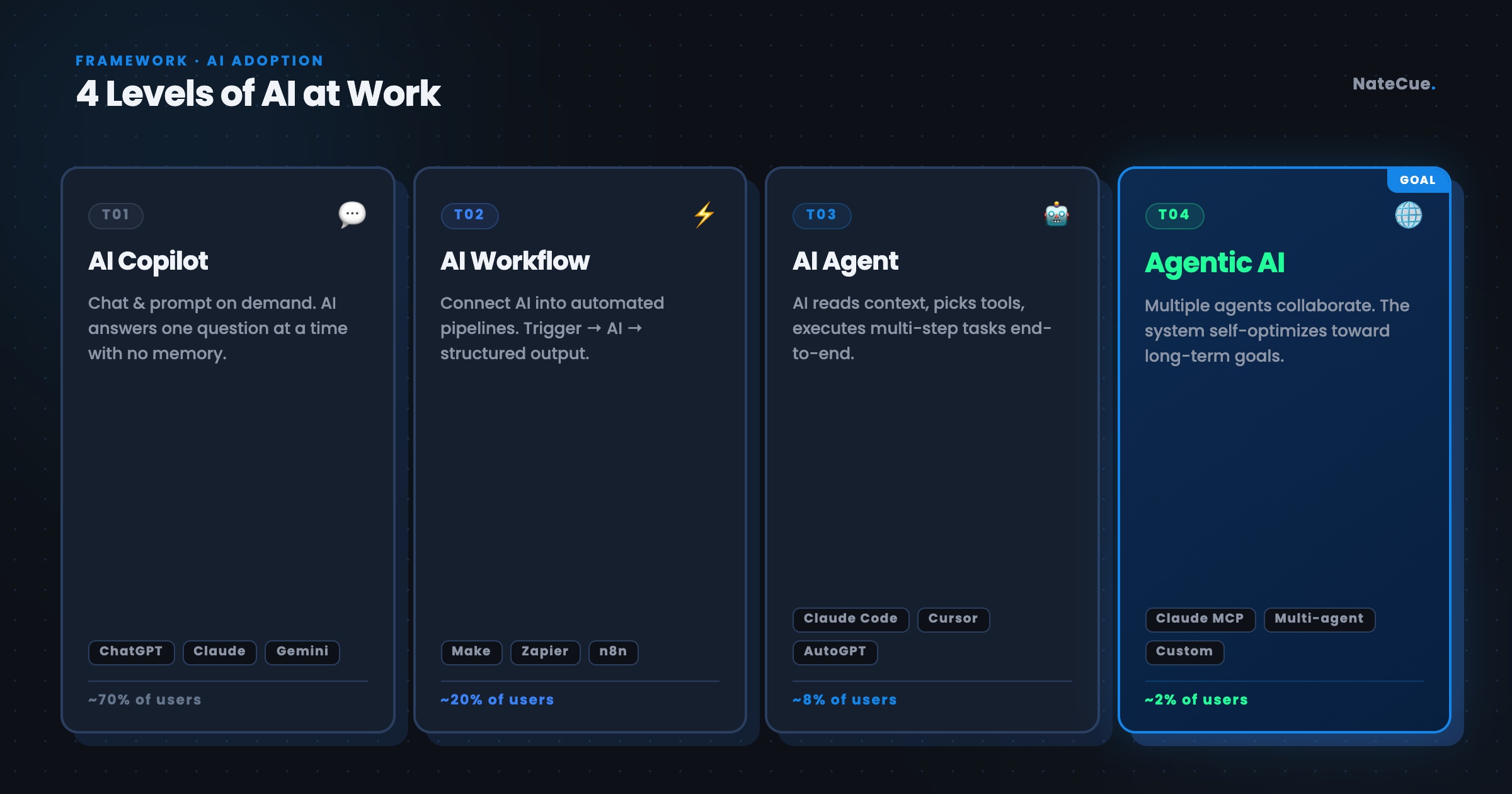
Layer 1: AI Copilot - Faster, But No Memory
AI Copilot is the most common way people use AI today: open ChatGPT, Claude, or Gemini, chat, get a result, close it. This layer is extremely useful for immediate tasks - drafting emails, summarizing documents, quick analysis, brainstorming ideas. You save significant time compared to doing it manually, and that’s why this layer has hundreds of millions of users.
But the limits of Copilot show up the moment your work requires deeper context. Every new conversation is a blank slate - AI doesn’t remember your brand, doesn’t know the tone of voice you’re building, doesn’t understand the history of your project. You have to re-explain everything from scratch each time. For one-off tasks, this isn’t too painful. But when work gets more complex - say you need to write 10 pieces of content maintaining the same voice, or need AI to understand the nuances of a specific industry - the cost of “re-teaching” AI every single time starts to get expensive.
Layer 2: AI Workflow Automation - Fewer Clicks, Still Missing Context
Workflow Automation solves the speed problem at a different level: instead of chatting with AI each time, you build automated flows - receive input data, classify, process, generate reports, send emails, update spreadsheets. People can cut out a significant amount of repetitive work, and that’s the real strength of this layer.
The problem is that automation also inherits the context limitations from Layer 1. You can automate the weekly report summary, but if the report needs to be written in a tone appropriate for each different audience - the product team, the executive board, or a client - standard automation doesn’t handle that distinction well. The workflow runs the right process, but lacks the understanding of “who is reading this and what do they need.” The result is output that’s technically correct but shallow in quality.
This problem gets even clearer with tasks that require continuously updated context. Take a content audit as an example: this week you run the audit, the workflow needs to know which posts went out this week, what the metrics looked like, which pieces performed well. Next week you want to run it again, the workflow needs this week’s data as a baseline to compare against and identify patterns. But there’s no mechanism in standard automation to remember and carry that information forward from one run to the next - you have to re-input it semi-manually every week. On paper it’s “automated,” but in practice you’re still doing the context-passing step by hand. Automation handles static processes well, but for things that need to “remember” something from last time to do better next time, it still needs a person in the middle.
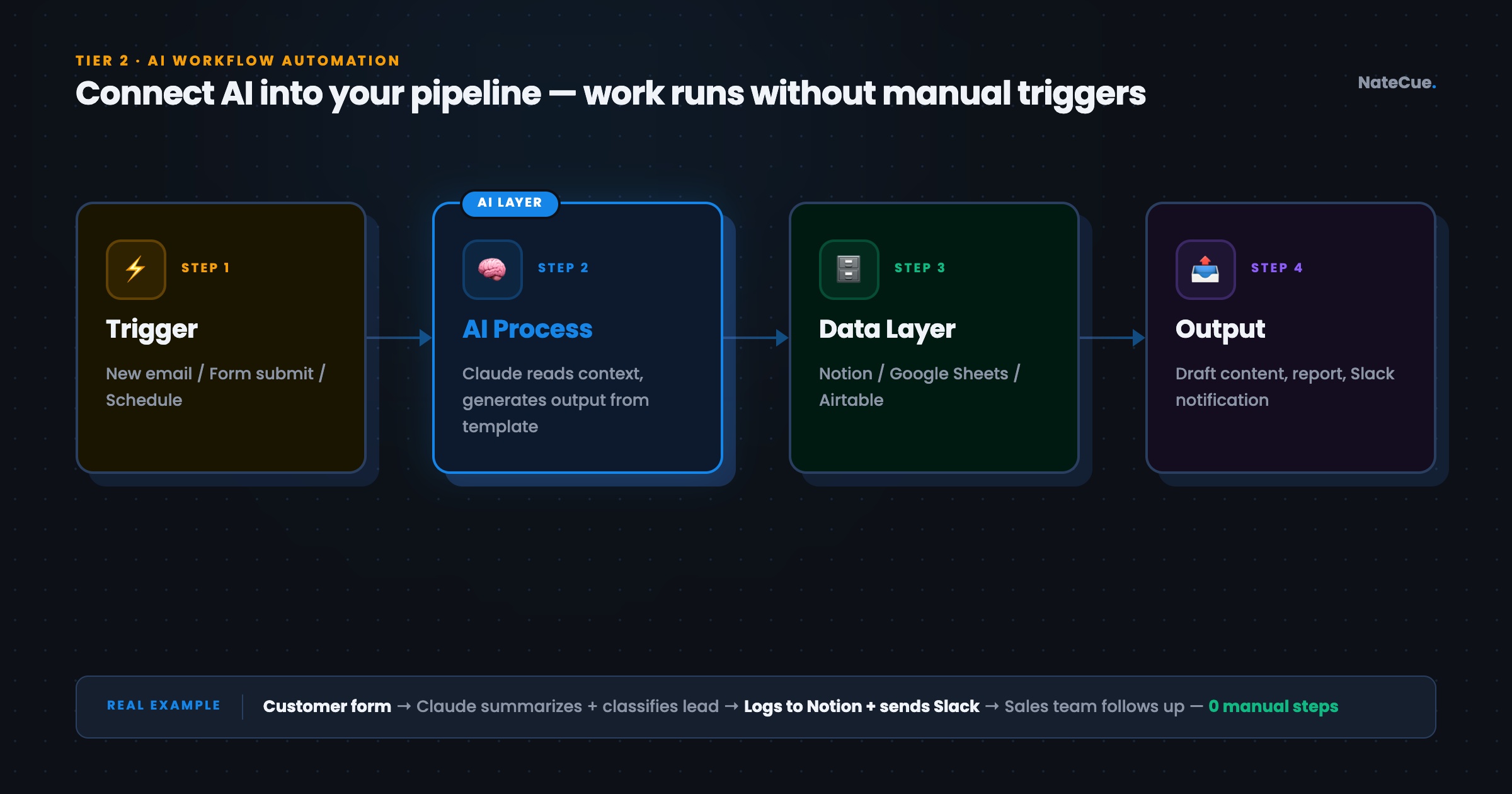
Layer 3: AI Agent - Delegate Work, Not Just Chat
AI Agent is the most important shift in this framework. Instead of you chatting with AI, you delegate work to AI - AI reads the context itself, picks the right tools on its own, executes multiple steps, and returns the result of a fairly complete piece of work. With Claude Code or Claude properly set up as an Agent, it can read a brief file on its own, find relevant information, create output in the required format, all in a single trigger.
The difference from Layers 1 and 2 is that Agents start to have the ability to maintain context throughout a working session, not just within a single conversation. This is why I find this layer solves part of the brand context problem that Copilot can’t - if you put brand guidelines into a workspace and the Agent is set up to read them before starting work, the results are noticeably different. But limits remain: when a task is complex enough to require multiple scopes running in parallel - research, writing, review, and formatting all at once - a single Agent starts to struggle.
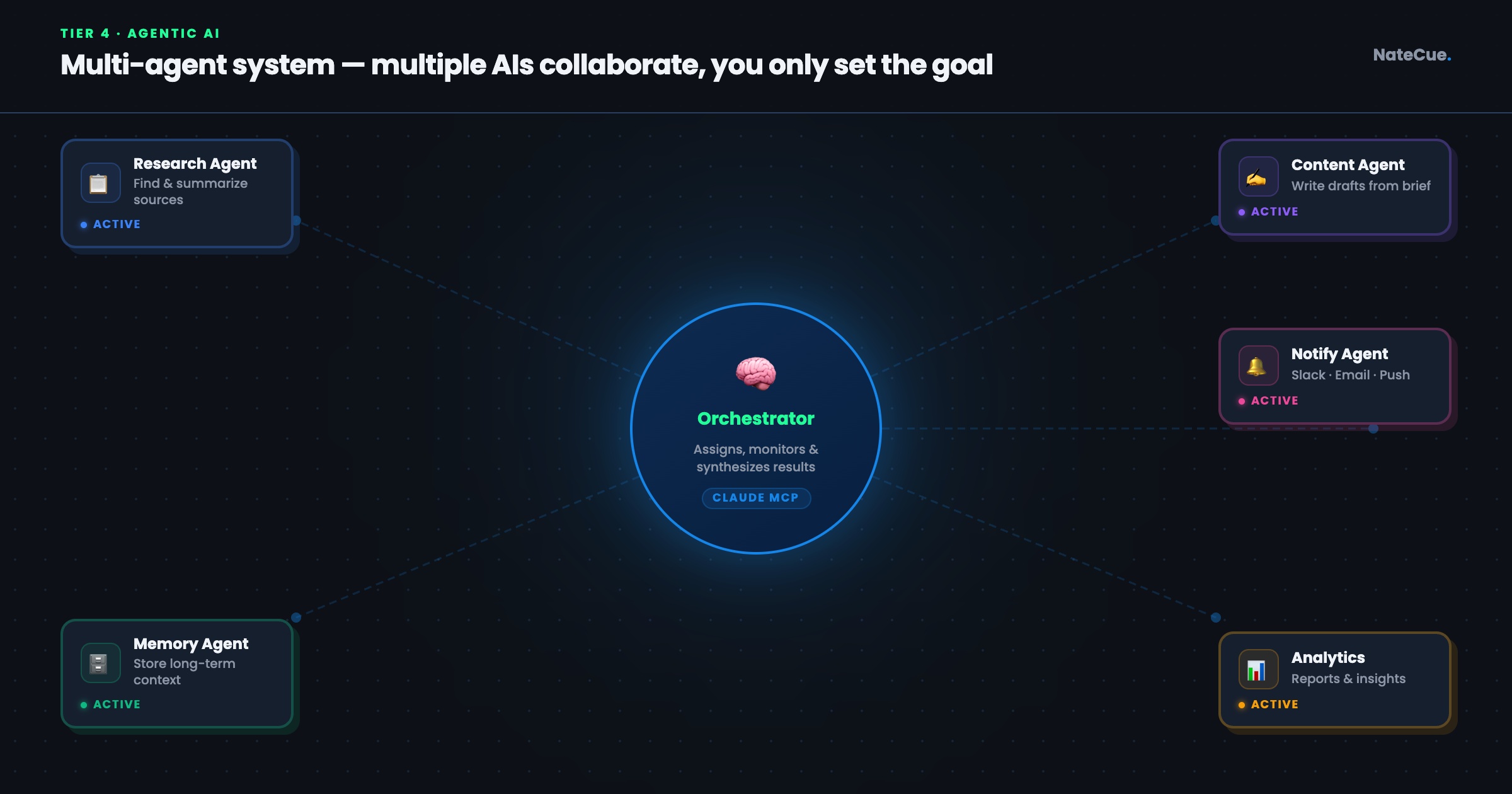
Layer 4: Agentic AI - Multiple Agents, One Goal
The highest layer is where multiple Agents work together, each handling a specific role. One Agent specializes in research, one in writing, one in review and quality check, one in formatting and delivery. They communicate with each other, share context, and together complete a complex goal without you needing to coordinate every step.
On the technical side, setups at this layer typically include a workspace folder organized so AI can read the full project context, GitHub for version control so Agents can track change history, and Claude Code to deploy those Agents into real workflows. This is the layer with the highest ROI - but also the layer that requires the clearest technical foundation. It’s not plug and play, it’s infrastructure.
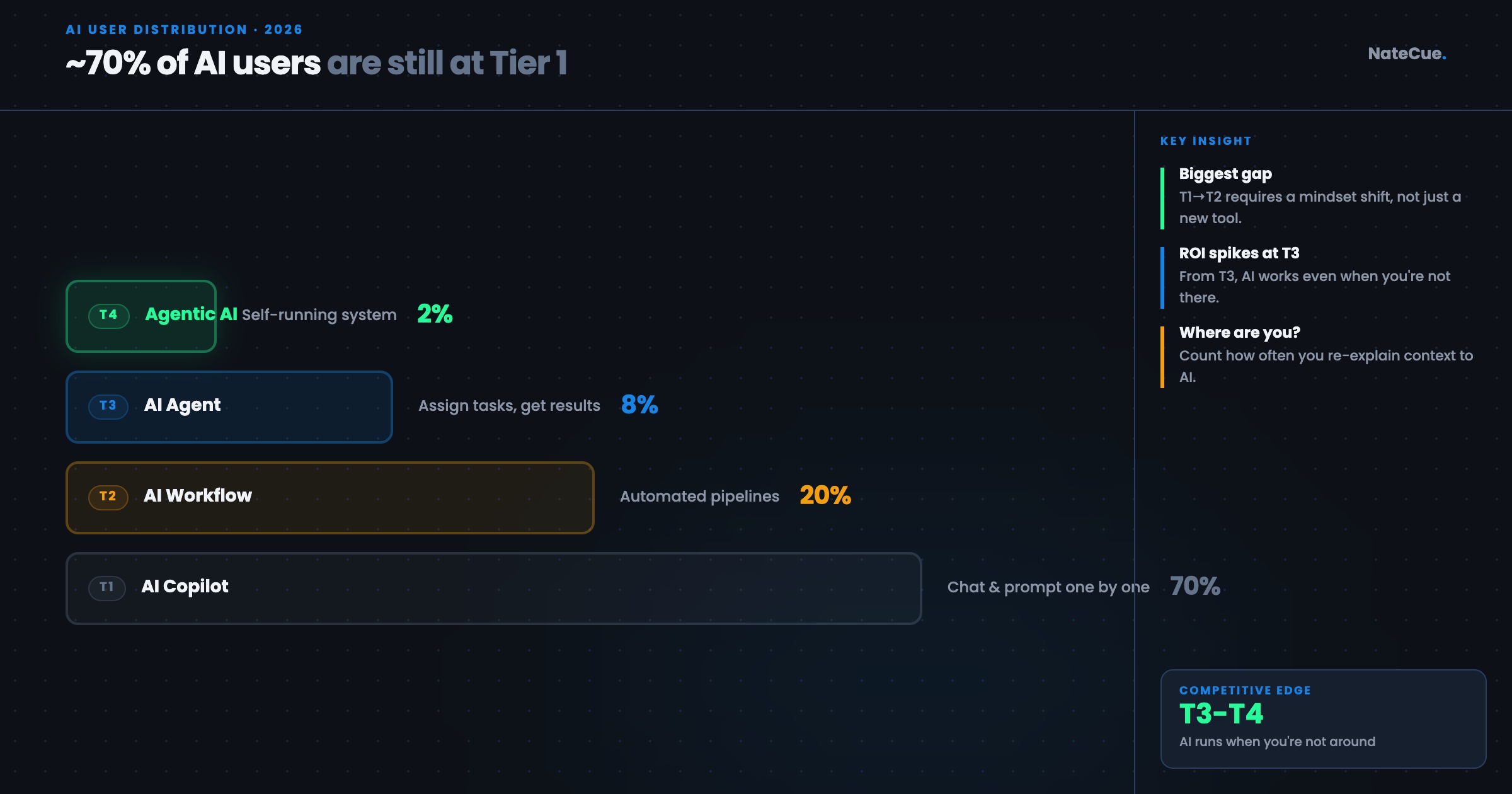
Why Most Users Are Stuck at Layers 1 and 2
From what I’ve observed, the majority of AI users in professional environments are at Layer 1, with a smaller group reaching Layer 2. The reason isn’t that they don’t want to level up - it’s that knowledge about Layers 3 and 4 is still scattered and hasn’t been structured in a way that’s accessible to people without a technical background.
Layers 1 and 2 are intuitive - you open an app, use it, see results immediately. Layer 3 and beyond requires you to understand some concepts about how AI Agents work, know how to set up a workspace, know how to write prompts as system instructions rather than casual chat messages. Not impossible to learn - but the learning path hasn’t been paved. And because this is something that needs someone knowledgeable to set up the first time, many people wait for “someone to set it up for them” instead of learning how to do it themselves.
That also means the people who do climb to Layers 3-4 have a genuine competitive advantage over everyone else - not because their AI is “smarter,” but because their AI is operating within a system that has context, has process, and can run most of the most time-consuming tasks on its own.
Which layer are you on? And which layer do you want to move up to next? If you’re at Layers 1-2 and want to understand what Layer 3 actually looks like in practice, I’ll write about that in more detail in upcoming posts.
Leave a comment or message me on LinkedIn if you have specific questions about setup.
Thanks for reading NateCue Insights!