

If you use Claude Code with more than one account - personal, work, or one per project - you’ll eventually run into a frustrating limitation: Claude Code only allows one active account at a time, with no built-in way to run them in parallel.
The situations this creates are varied. You might be running servers or automations under account A, then need to switch to account B for something else - every switch means claude auth logout followed by claude auth login, losing the previous session’s context entirely. Or, like me, when using Claudian (the Claude Code plugin for Obsidian), some vaults need a personal account while others need a work account - but Claudian only reads a single CLI path, so there’s no way to split per-vault. There’s also the case where a work account has features disabled by org policy that your personal account doesn’t - and you need both running at the same time without conflict.
After some digging, I found a clean solution: use CLAUDE_CONFIG_DIR to create two independent config directories that run completely in parallel, no switching needed.
Claude Code stores everything in one place - and that’s the problem
By default, Claude Code stores all its state in ~/.claude/: auth tokens, settings, memory, the list of trusted projects. One folder means one active account at a time. Switching accounts means logging out and back in - which wipes the previous session, taking all of that account’s context with it.
For most users this isn’t an issue. But if you’re using Claude Code across two different contexts - work and personal - that “one folder for everything” design starts causing friction. Work accounts often have features restricted by org policy, like Remote Control being disabled, or CLAUDE.md files set up specifically for work context that you don’t want bleeding into personal projects. And every switch wipes the other account’s context entirely - not a comfortable way to work.
CLAUDE_CONFIG_DIR - the environment variable most people overlook
CLAUDE_CONFIG_DIR is an environment variable that lets you point Claude Code to a different folder instead of the default ~/.claude/. When you pass this variable, Claude Code reads auth and settings from that folder instead - two instances running with two different config directories are completely independent, with no interference between them.
The idea is simple: instead of one “home” for all accounts, you create a second one. Each account lives in its own directory and they never meet. In my setup, ~/.claude/ holds the personal account (Claude Pro), and ~/.claude-work/ holds the work account. When I need to use the work account, I just prepend CLAUDE_CONFIG_DIR=~/.claude-work to the command - that’s it, no logout, nothing else.
Step-by-step setup
First, create a separate config directory for the second account:
mkdir ~/.claude-workThen log that account into the new directory:
CLAUDE_CONFIG_DIR=~/.claude-work claude auth loginA browser window will open for you to choose an account. Once logged in, credentials are saved to ~/.claude-work/ instead of the default directory. Verify by running both commands below and confirming they return two different emails:
# Default account (personal)
claude auth status

# Second account
CLAUDE_CONFIG_DIR=~/.claude-work claude auth status
To avoid typing the env var every time, add an alias to ~/.zshrc:
alias claude-work="CLAUDE_CONFIG_DIR=~/.claude-work claude"From here, claude is personal and claude-work is work - running in parallel across two terminals with no conflicts.

Using with Claudian and other integrated tools
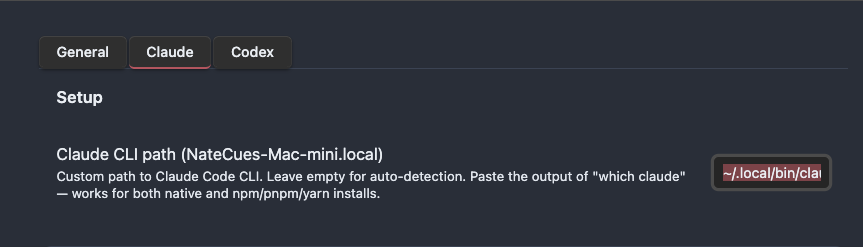
Claudian - the Claude Code plugin for Obsidian - reads the CLI path from settings, which means you can point it to a different binary instead of the default claude. To create a “work version” of Claude for Claudian to use, write a wrapper script:
cat > ~/.local/bin/claude-work << 'EOF'
#!/bin/zsh
export CLAUDE_CONFIG_DIR=~/.claude-work
exec $(which claude) "$@"
EOF

chmod +x ~/.local/bin/claude-work
The script does nothing except set CLAUDE_CONFIG_DIR and pass all arguments to the original binary. Then in Claudian settings, any workspace that needs the work account gets its CLI path pointed to ~/.local/bin/claude-work. Personal workspaces stay on auto-detect as before. Two Obsidian vaults, two accounts, running in parallel inside the same app.
For launchd Remote Control agents, once you switch the default ~/.claude/ back to the personal account, just reload all the agents:
for f in workspace1 workspace2 workspace3; do
  launchctl unload ~/Library/LaunchAgents/com.yourname.claude-remote-$f.plist
  launchctl load ~/Library/LaunchAgents/com.yourname.claude-remote-$f.plist
done
All agents should connect and show an env_... ID - that means success.
One thing to know before you start
Each config directory is a blank slate. CLAUDE.md files, memory, and the project trust list in ~/.claude/ won’t automatically migrate to the new directory - you’ll need to set those up separately for the second account if needed. Same goes for MCP servers: there’s currently no way to share config between two directories, so if you rely on several MCPs, you’ll need to configure them independently in each folder.
For me, the two contexts are different enough that sharing settings isn’t necessary - personal leans toward writing and side projects, work leans toward team workflows. But if your setup is more complex, this is a trade-off worth thinking through upfront.
This works because CLAUDE_CONFIG_DIR is a standard env var that Claude Code supports - not a hack, not a complex workaround. I spent an entire afternoon debugging launchd agents before realizing the problem wasn’t the config at all, it was the auth. The fix turned out to be creating one extra folder.
If you’re running Claude Code across both personal and work accounts and getting tired of switching back and forth - give this a try. And if you’re setting up Remote Control or Claudian with multi-account, drop a comment below - I’d love to hear how your setup looks.
Thank you for reading NateCue Insights!